Hi, I just signed up for this since many of the threads seemed helpful. I'm hoping someone can help me with a Mac OS X 10.2.8 problem.

I recently purchased an HP Deskjet 5440 and it works just great when connected to the USB port directly. I have a Hawking Tech HPS1U 1port USB network print server that I have connected to my switch. It works with the new printer fine from a Windows box.

The problem is that I can't seem to find the "printer driver" to select when I try to set up the Mac for IP printing. I am assuming I should be able to find the driver somewhere since it works for the USB. Can anyone help?

I have used the Hawking print server from this Mac but with a Epson that died but then I could use a GIMP-driver.

HP tech support says they only support direct USB connections but hey, it's a wireless world, ain't it?

Thanks, Doug
Dani AI

Generated

Short summary and next steps — you already have the HP driver working for USB (good), so the missing piece is how the Hawking HPS1U presents the DeskJet to the Mac. The HPS1U can speak AppleTalk, LPR/LPD, IPP and raw (JetDirect/port 9100), and it has a web/utility interface to enable those services — so either let the Mac discover the printer via Rendezvous (10.2’s Bonjour) or add it as an IP/LPR printer using the HPS1U’s IP address. (manualslib.com)

On Mac OS X 10.2 the printing app is Print Center (Applications → Utilities). Use Add → choose Rendezvous to let the HPS1U/attached printer appear automatically; if that doesn’t show, choose IP Printing (or LPD/LPR) and enter the HPS1U’s IP. If you add by IP, pick the correct protocol (LPD, IPP or HP JetDirect/Socket) and then Select Software to choose the DeskJet 5440 driver/PPD. See Apple’s guidance on adding an IP printer and the printer vendor manuals for the Print Center steps. (support.apple.com)

If the DeskJet driver doesn’t appear in the “Use / Select Software” list when adding by IP: reinstall the HP Mac driver (the 5400-series driver covers the 5440 on Mac OS X 10.2.x), then quit and relaunch Print Center so the new PPDs are reloaded. If discovery still fails, open the HPS1U’s web admin (or Hawking setup utility), verify the device IP, and enable LPD or RAW/IPP so the Mac can reach the queue. The HPS1U quick/manual pages show the Mac-specific instructions and example default IP used for initial setup. ()

Troubleshooting checklist: confirm the HPS1U IP (print its config page or use the Hawking utility), enable LPD/RAW/AppleTalk as needed, try adding via Rendezvous first and fall back to IP/LPR if that fails, and reinstall the HP driver if it’s not selectable. The HPS1U manual and Apple’s printer-setup notes are the definitive references for those steps. (manualslib.com)

Recommended Answers

All 3 Replies

I would suggest installing this...
http://www.techspot.com/drivers/driver/file/information/7339/
before going into the Printer Setup Utility and adding it. (And it does show up in Bonjour, doesn't it?)

I have installed the HP application referenced in this link. This is how it prints through the USB interface.

How do I check if the printer shows up in Bonjour, which I think was called Rendezvous back in OS 10.2? I ws trying to set the printer up through IP Printing but if there is a beter way I'm open to it.

Thanks for the response.

How do I check if the printer shows up in Bonjour, which I think was called Rendezvous back in OS 10.2? I ws trying to set the printer up through IP Printing but if there is a beter way I'm open to it.

Yes, Bonjour was called Rendezvous way back when (Apple had to change it due to legal issues with another company).

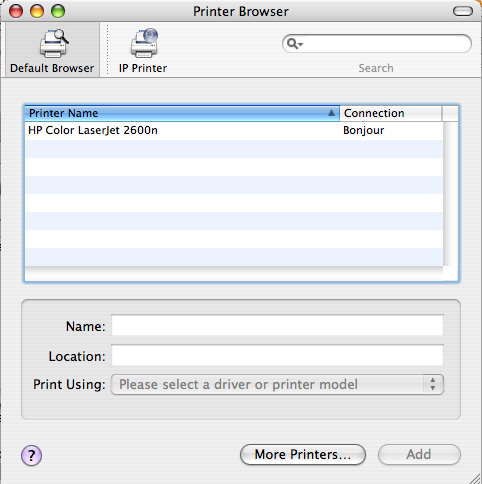
OK, this is an OS 10.4 screenshot, but hopefully 10.2 is similar. Note that the tab selected is "Default Browser" and NOT "IP Printer". This HP is has a built-in print server, so I don't need to deal with a USB server, but yours should be similar.

Be a part of the DaniWeb community

We're a friendly, industry-focused community of developers, IT pros, digital marketers, and technology enthusiasts meeting, networking, learning, and sharing knowledge.