I have a lenovo r61 and it is running pretty slow on 1gb I am upgrading to 2gb soon but I want to make it faster, if I turn off some of Windows vista's services will it make it faster? and what should i disable?
Any help would be apreiciated!
I have a lenovo r61 and it is running pretty slow on 1gb I am upgrading to 2gb soon but I want to make it faster, if I turn off some of Windows vista's services will it make it faster? and what should i disable?
Any help would be apreiciated!
Useful, safe steps to try while waiting for the RAM upgrade (and to diagnose what’s really slowing the machine). Several posters here (, , ) have touched on causes; the list below focuses on measurable checks and low-risk fixes instead of randomly disabling services.
Open Resource Monitor (resmon) and Task Manager and watch the top offenders under CPU, Disk and Memory. In Resource Monitor’s Disk tab see which process has the most I/O; in the Memory tab watch Hard Faults/sec (paging). Check Event Viewer for repeated disk or driver errors. Run a system file check (sfc /scannow) and schedule a disk check (chkdsk c: /f) if you see disk-related events.
Low-effort tweaks that often help: run Disk Cleanup and then Defragment (HDDs only), switch Visual Effects to “Adjust for best performance” in System > Advanced > Performance, uninstall unused large applications, and make sure Windows Updates and device drivers are current. If a USB 2.0/3.0 flash drive is available, try ReadyBoost as an interim speed-up.
If you really want to touch services, do it conservatively. Create a restore point first. Consider setting to Manual (not Disabled) services you definitely do not use: Print Spooler (no local printer), Bluetooth Support (no Bluetooth hardware), Windows Media Player Network Sharing (no media sharing), Windows Search (if you rarely search). Change one service at a time and re-check Resource Monitor after each change.
Measure before/after so changes are visible. After the RAM upgrade, re-run the same checks — what looks bad now (paging, disk I/O, or CPU spikes) may disappear, and you can then safely roll back any temporary tweaks.
Jump to Post— jbennet 1,618in some cases turning off "superfetch" can increase peformance substantially. in other cases it can reduce it. try it
Jump to Post— Infarction 503AFAICT, most of the services running take relatively little memory. Vista is pretty aggressive in it's use of memory though, so upgrading to 2GB should make a big difference.
Jump to Post— jbennet 1,618superfetch is the thing that caches all your memory
having stuff cached can be faster but it makes bootin g and logging in slow as hell
Jump to Post— jbennet 1,618caches stuff you use a lot into RAM
in some cases turning off "superfetch" can increase peformance substantially. in other cases it can reduce it. try it
AFAICT, most of the services running take relatively little memory. Vista is pretty aggressive in it's use of memory though, so upgrading to 2GB should make a big difference.
superfetch is the thing that caches all your memory
having stuff cached can be faster but it makes bootin g and logging in slow as hell
superfetch, what does this actually do?
caches stuff you use a lot into RAM
it hasn't made much of a difference, is they anyway I can make it faster?
what will happen if I turn off all the services?
Things might start to break (e.g. Windows logon service). Seriously, wait and see what the new RAM does.
how much ram you have on the system , how many programs do you have starting with windows. (items in the task bar by the clock) as for turning off services this will not make a drastic improvement in speed. follow infarction advices get more memory
I have been in MSCONFIG and tunred everything off apart from AVG 7.5 so I dont think that is a problem and I only got a few programs like macromedia studio 8 and camtasia studio and office 07
And I have 1gb of ram :(
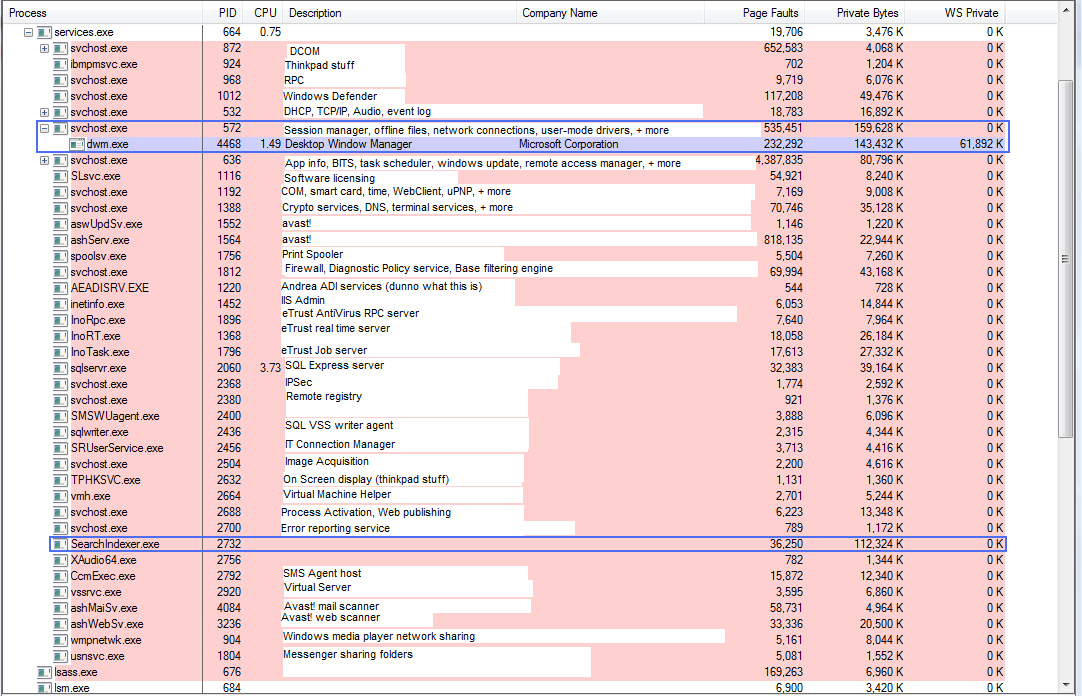
I'm guessing part of the problem is that you're running some memory intensive programs. Most services take relatively little memory (see attached), except some take more if it's available (like the window manager, dwm.exe, for example). I'm pretty sure Macromedia Studio takes a good chunk and I'd guess the same for the other studio. Office is probably a little bit less but still uses a bit. Turning off some services may help, but pinching 4MB processes won't make much difference.
exactly.
best way is to just het 1gb more ram
on 2gb my lenovo c200 runs blazingly fast
Well I will get the memory soon!
We're a friendly, industry-focused community of developers, IT pros, digital marketers, and technology enthusiasts meeting, networking, learning, and sharing knowledge.