I've had it..
Here's my dilemma (and I'm not a techie, so easy on the feedback)

I have Windows98
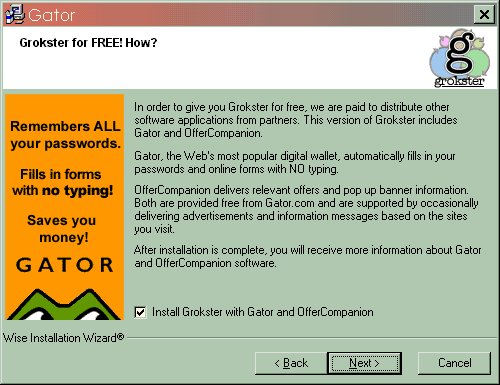
I have Grokster (it's a music downloading program) www.grokster.com
They forced me to download a new version (the old one would no longer connect me to their software).
So far so good... as soon as I got the download now I notice various ugly things... they incorporated myway, lycos, spyware, ads and all kinds of trash.. if that wasn't bad enough, my computer now is basically useless.
Whenever I turn on my computer I get various errors:
wupdater.exe seems to always be running
there's some file (i don't know what) that wants to immediately look for online connection. A window pops up asking me if i want to connect or work offline.
AOL doesn't work either. I can dial up ok, get connected and immediately get kicked off with a WAOL has performed an illegal operation.
I tried to uninstall the Grokster s/w using Settings, Control Panel, Add/Remove Programs. I clicked on Grokster, click on uninstall. It will not remove the program.
Please any help... I did run Antivirus, but did not find any bugs at all.
I'm about to trash the computer...
Dani AI

Generated

Short, practical cleanup notes for the Grokster / wupdater.exe / WAOL symptoms reported by , plus a few clarifications tied to ’s startup advice.

wupdater.exe is frequently not a Windows updater but an adware/“updater” component (historically tied to eUniverse / KeenValue) that stays resident and reinstalls itself if not fully removed. Confirm the file path before acting (badware commonly lives in a Program Files\Common Files\updater or a Windows subfolder). (file.net)

Immediate plan (do these first, in order): disconnect the modem/Internet, boot into Safe Mode, and make a registry backup. In Windows 98 the startup menu is reached with CTRL (or F8 on some systems); use the Windows Registry Checker (scanreg /scan and /backup) before editing anything. Once offline and backed up, remove suspicious shortcuts from the Start Menu\Programs\Startup, check WIN.INI (load/run lines) and SYSTEM.INI (shell=), then inspect the registry Run/RunServices/RunOnce locations for entries that launch wupdater or other unknown EXEs. (ftp.zx.net.nz)

After that, use targeted tools (run them from Safe Mode if possible): an up-to-date on‑demand anti‑malware scanner, a startup/autorun inspector to disable and remove persistence entries, and a detailed startup scanner to remove leftover hooks. Autoruns (Sysinternals) shows every autostart location; HijackThis-style logs and modern scanners (Malwarebytes / similar) find and remove adware components. If a file is found (for example wupdater.exe), delete the file after stopping the process, then remove the associated Run/Uninstall registry entries and any folder it installed. Repeat scans until clean. (learn.microsoft.com)

If Add/Remove Programs won’t uninstall, either reinstall then uninstall, or remove the program’s Uninstall key under HKEY_LOCAL_MACHINE\SOFTWARE\Microsoft\Windows\CurrentVersion\Uninstall (export the key first as a backup). If WAOL/AOL still crashes after the adware is removed, reinstall the AOL client and modem/dial‑up drivers. If multiple removal attempts fail, back up personal data and consider a clean reinstall as the last resort. (flylib.com)

Quick command reminders (run from Safe Mode / command prompt):

scanreg /backup
regedit

Notes and cautions: always backup the registry and important files before edits; removing the wrong Run/Win.ini entries or registry keys can make Windows unbootable. These steps focus on Windows 98-era fixes and persistent adware patterns; follow each step carefully and repeat scans until no wupdater/updmgr-type entries remain.

Recommended Answers

All 3 Replies

Do not panic!!!! This is going to be an easy fix.
First download STARTER and stop everything(gator,grokster as much as you can) from starting up on Boot. http://www.webattack.com/downloadfind.php?st=starter&search=Search&action=s
Second take a look at this remedy

BIG"B's Linked Online Security FOR XP
********************************************************************************************************************************************************************************************************
SOFTWARE
Top Four Security Downloads (you must have them)

Note: All downloads above are worthless without updates

Oh and dont forget about the added spyware Grokster gives you free of charge called GATOR is this in your tool bar?

Thanks for the pointers... I'll see any of your suggestions work.
Is there any s/w out there that can force a program to be uninstalled with all of its original components and add-ons?

I'll post tomorrow my findings...
thanks again

You check your computer security and you check it often,there aint no reason not to.

Be a part of the DaniWeb community

We're a friendly, industry-focused community of developers, IT pros, digital marketers, and technology enthusiasts meeting, networking, learning, and sharing knowledge.