i dont know if im posting in the right place or not but what do most of you feel about this is there any safe way in doing this that wont harm your computer? are programs such as windows blinds and etc safe? what are your suggestions, etc? post your tips and what not here.

- Dave

Dani AI

Generated

asked whether changing XP's look is safe; and demonstrated how far visual changes can go, and sensibly pointed out built‑in options. The practical truth: dramatic makeovers are possible, but many installers modify system UI or run low‑level hooks. That gives the effect you want — and it gives you something to fix if it goes wrong. The checklist and recovery steps below fill gaps the replies didn’t cover.

Before installing anything, do these first:

  • Create a System Restore point and, if possible, a full disk image so you can return the PC exactly as it was.
  • Test risky packs in a virtual machine or on a spare system before touching the main install.
  • Prefer tools that run at user level (icon packs, docks, wallpaper, cursor sets) over tools that patch system files.
  • Inspect the download source, read other users' comments, and scan files with antivirus; keep any original files the installer asks to replace.

If a theme or skin breaks the desktop, try this in order:

  • Boot Safe Mode (press F8 while starting) and use Add/Remove Programs or the theme tool’s uninstaller.
  • If an uninstaller isn’t available, run sfc /scannow to restore protected system files or use System Restore to roll back changes.
  • If the shell won’t load, restore your image or use "Last Known Good" to recover a working configuration.
  • When a theme required a patched UI file, restore the original from your backup or run a repair/install of the same XP Service Pack to replace modified system DLLs.

For low risk: start with small changes (icons, wallpaper, fonts, a dock) before full theme installs. If attempting big visual mods like those shown by , follow ’s idea that commercial solutions often include uninstallers — but still back up first.

Recommended Answers

All 3 Replies

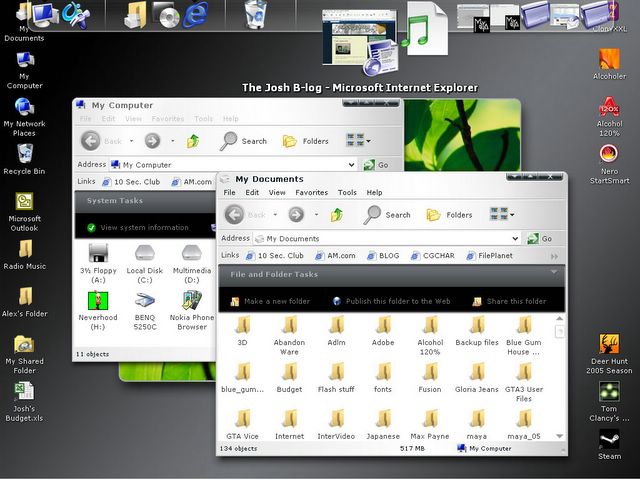
There is a BRILLIANT program that customises everything about WinXP to make it look more like Longhorn.

It's called it's about 20Mb. Once you've installed it you can also download different apperances without needing to download entire theme files.

The file also comes with Yz Toolbars which is a brilliant little program to change the look of the explorer toolbar.

here's a screenshot of my desktop with Longhorn Inspirat.

Since then I've made my pc look more like a mac, very cool.

i dont know if im posting in the right place or not but what do most of you feel about this is there any safe way in doing this that wont harm your computer? are programs such as windows blinds and etc safe? what are your suggestions, etc? post your tips and what not here.

- Dave

I've been using Windowblinds for nearly a year with no real problems except whenever I load a faulty skin, but even then it's only cosmetic stuff that don't interfere with the functionality of Windows at all. I personally highly recommend it; it's all kinds of fun!

Except WindowBlinds isn't free...
What exactly do you want to change? There are a few different options in Display Options, Appearance tab. Don't change anything in Advanced unless you use Windows Classic, it WILL make things not look so good :(

Be a part of the DaniWeb community

We're a friendly, industry-focused community of developers, IT pros, digital marketers, and technology enthusiasts meeting, networking, learning, and sharing knowledge.