Hello fellow techies & the true guru---Dani,

It's me, Carmine.

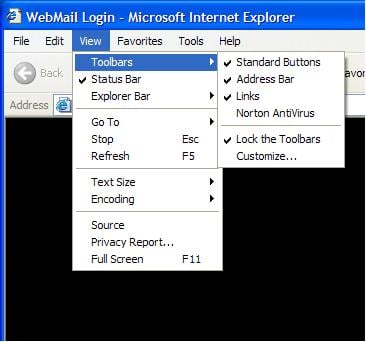
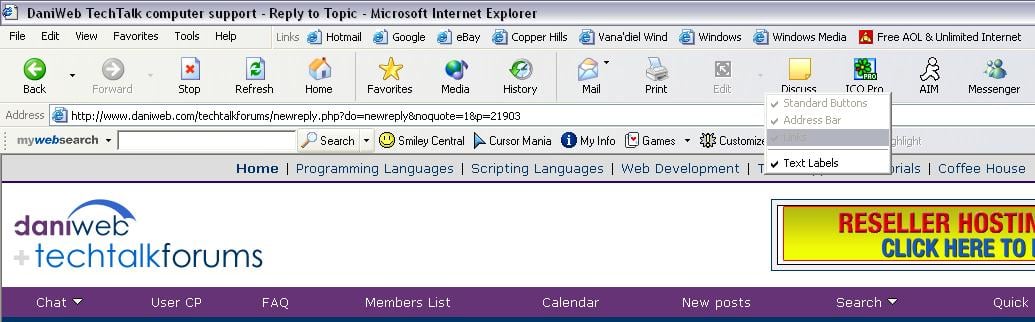
I would like to ask if anyone has had their options to change the toolbar choices
gray out. I have done all the spyware checks and reloaded IE6 on my win 2000 rig.

I just can't find out what happened. I think because my little cuzin was bouncing aroung the net and went somewhere he should'nt have ( 16yrs old ) I found a dirty pic in a temp folder----ha ha ha Tony, I know what you did.... little punk lol

Back to my plight, can anyone advise where to go next. I also searched the registry for any changes and additions. ( maybe the wrong hive )

Any help would be sweeeeeeeet.

thanks a gigabyte :D

Dani AI

Generated

Short summary and what actually happened: this is a common symptom when Internet Explorer/Explorer toolbar customization has been locked by a policy or by malware that flips policy-type registry values. eventually found and flipped a registry value to restore “Customize,” and posted a registry merge that automates removal of those policy entries. The underlying mechanism is the same admins use to lock toolbars via Group Policy (so the setting can be applied by an admin or by nastier software). Microsoft: IE administrative templates / Toolbars. (learn.microsoft.com) (geoffchappell.com)

Quick, safe troubleshooting checklist (do these in order):

  • Back up first: export the registry branch you plan to touch (Regedit → select key → File → Export). Microsoft documents the manual registry backup/import steps. How to back up and restore the registry (MS). (support.microsoft.com)
  • Scan for malware with updated scanners (Malwarebytes, Spybot/Ad‑Aware or similar) and remove anything found—malware often sets these values. (help.malwarebytes.com)
  • Temporarily turn off third‑party browser extensions (Internet Options → Advanced → uncheck “Enable third-party browser extensions”) and restart IE to see if a toolbar add‑on is forcing the lock. [MS: disable third‑party tool bands/BHOs]. (support.microsoft.com)
  • Use Autoruns (Sysinternals) to list and disable non‑Microsoft BHOs and toolbars so you can test whether one of them re-applies the restriction. [Autoruns download/info]. (learn.microsoft.com)

When to reset layout vs. policy entries: if the toolbar layout itself is corrupted you can reset the saved layout value (ITBarLayout) so Explorer/IE rebuilds a clean toolbar configuration; Microsoft documents that procedure. If the Customize control is dimmed because of policy entries, remove or reset those policy values (or unset the Group Policy) only after the backup. [Reset ITBarLayout / restore toolbars (MS KB)]. ()

Notes and cautions: always export the keys you change, test under a non‑admin account first if possible, and remember domain GPOs will reapply settings — contact the domain admin if the machine is joined to a domain. If these steps don’t stick after removing malware and resetting keys, post an Autoruns or HijackThis log (scrub personal data) so others can spot the persistently reapplying component.

Recommended Answers

All 6 Replies

by "done all the spyware checks" what have you done? Have you used spybot? If so, have you checked for updates? Even when you download spybot's latest version, the adware definition list doubles when you use the check for updates feature.

Are you referring to the toolbar at the top of the ie window? (i'm not quite sure what you're asking)
I know you can right click on the toolbar and there's a reset for the buttons....

I attached a screen shot if you could maybe circle what you're talking about.

no, I don't have that problem and I know not of any way that you could gray out your toolbars. And if it did, 0.o it's quite weird. I don't think the cause would be spyware though.

I found the problem, some spyware hit the reg file. there was a hive that I can't remember.... 4hrs to find on the win 2000 rig. I had to change the 1 to 0 so customize was active. I had to do the same for internet explorer and explorer. I thank you all for the advice and responses. stay well = Carmine =

Hi! I'm having the same problem. Can anyone help me? I'm no expert. here is a screen shot of the problem

Try this.

1. Open an empty Notepad file.

2. Copy the following and paste it into the new Notepad file.

REGEDIT4
[HKEY_CURRENT_USER\Software\Microsoft\Windows\CurrentVersion\Policies\Explorer]
"NoBandCustomize"=-
"NoToolbarCustomize"=-
"Btn_Search"=-
"SpecifyDefaultButtons"=-
[HKEY_LOCAL_MACHINE\Software\Microsoft\Windows\CurrentVersion\Policies\Explorer]
"NoBandCustomize"=-
"NoToolbarCustomize"=-
"Btn_Search"=-
"SpecifyDefaultButtons"=-

3. Save the file as 'isearchfix.reg'

4. Double click on this file and merge it into your registry.

Your Toolbar Options should now be available.

Be a part of the DaniWeb community

We're a friendly, industry-focused community of developers, IT pros, digital marketers, and technology enthusiasts meeting, networking, learning, and sharing knowledge.