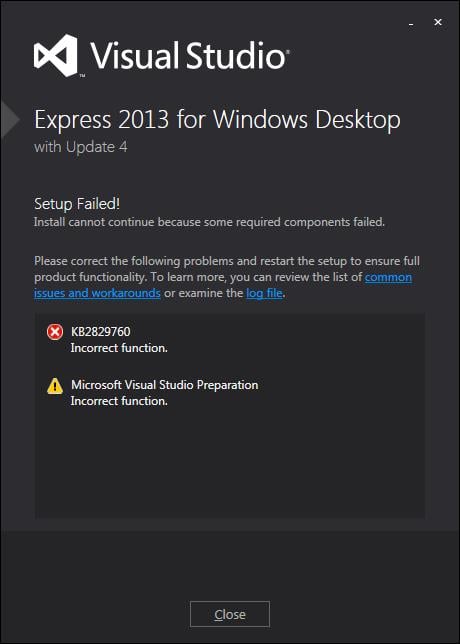
I thought I'd install the newest Visual Studio (2013) but all that happens is this (see below). I have all available updates installed plus the latest C++ runtimes. Does anyone have any suggestions? Attempts to get the referenced update result in downloading Visual Studio 2013 Update 3 and when I try to install that it says I can only install it after I install Visual Studio 2013 which I can't install until after I install the patch which is apparenty included in the update.
clip-0000.jpg

Dani AI

Generated

Short troubleshooting add-on (follow-up and quick checklist based on the thread)

The symptom described (installer failing with an “incorrect function” and Update insisting it run after the product) is most commonly an integrity or bootstrapper/mirror mismatch rather than a compiler/runtime issue. ’s fix—getting the installer from a different source—points to a corrupted download or a bad CDN/mirror. ’s idea to verify checksums is the right first step; official Visual Studio ISOs and bootstrappers are available from Microsoft’s older downloads pages. (See Visual Studio 2013 release notes / downloads: https://learn.microsoft.com/visualstudio/releases/2013/vs2013-community-vs). (learn.microsoft.com)

How to check the file you downloaded (two quick commands)
Run one of these and compare the output to the published hash:

PowerShell (recommended):

Get-FileHash "C:\Users\you\Downloads\vs_community.exe" -Algorithm SHA256

Command prompt:

certutil -hashfile "C:\Users\you\Downloads\vs_community.exe" SHA256

Use the published checksum on the download page; mismatches mean re-download. Docs: Get-FileHash and CertUtil. (learn.microsoft.com)

If the installer still fails: quick, ordered checks

  • Run the bootstrapper from a local folder (C:\temp), not a network share or a path with non-ASCII characters; UAC/elevated processes often can’t see mapped network drives.
  • Clear the installer temp and package cache: delete %TEMP% entries created during the failed run and any partial Visual Studio package folders.
  • Temporarily disable third‑party AV/network filtering and run the installer elevated (Run as administrator).
  • Repair system files if I/O looks problematic:
    sfc /scannow
    DISM /Online /Cleanup-Image /RestoreHealth

Collect logs and where to look
Use Microsoft’s Visual Studio log collector (Collect.exe) to produce %TEMP%\vslogs.zip and inspect the ddbootstrapper, ddinstaller and ddsetup* logs for exact error codes. The main Visual Studio install troubleshooting docs explain what to look for and next steps. (microsoft.com)

Offline layouts / certificate issues
If installing from an offline layout, install the layout’s certificates (Certificates folder) into the local machine stores before running the bootstrapper (or use the documented scripted install). Missing or invalid certificates frequently produce silent failures. (learn.microsoft.com)

Summary checklist: verify checksum, run from a local admin account, disable AV/proxy while testing, run SFC/DISM for disk/system issues, collect logs with Collect.exe and compare dd_*.log entries to Microsoft troubleshooting guidance. (microsoft.com)

Recommended Answers

All 4 Replies

I've never installed that but looking into 'incorrect function' makes me think that there is something wrong with the installation file itself, well the integrity of it. Try checking MD5 checksum of the file on your pc and the server that you downloaded it from(They must've provided one there)

You'd think that there would be a checksum check built in to the installer in which case it could just say "the install file is corrupt." In any case, I've downloaded it twice with the same (non)result. I prefer to download the iso and install locally but I tried the internet install (which inclludes Update 4) and got exactly the same outcome.

Downloaded from a different source and it installed corretly.

Sweet =)

Be a part of the DaniWeb community

We're a friendly, industry-focused community of developers, IT pros, digital marketers, and technology enthusiasts meeting, networking, learning, and sharing knowledge.