I have IE6, I'm pretty sure I have the service packs on it and everything, and I'm running Windows XP Home. I sort of noticed this starting a month or so ago, but it's weird, even for .zip and .exe files it won't let me "Save Target As.." anymore. What could be causing this?

Dani AI

Generated

A few extra, practical checks that aren’t in the replies: several members here (notably and ) hit the usual cache / Content Advisor causes, but if Save Target As is still greyed out these steps will help isolate and fix less-obvious causes.

Try a simple isolation test first. Save a tiny HTML file locally with a plain anchor to a real file and open it in IE — if Save Target As works there but not on the site, the site is likely intercepting the right‑click or using nonstandard link behavior (scripts/CSS or non-anchor handlers). A minimal test link to try:

<a href="https://example.com/file.zip">test download</a>

If that fails everywhere, move on to the browser-level checks below.

Check IE download and caching behaviors. A disabled “File download” setting in the Security zone will block downloads; also IE’s “do not save encrypted pages to disk” option can break saving from HTTPS pages — both have been documented causes of download/save problems. See the Microsoft troubleshooting guidance for these settings.
Microsoft troubleshooting: file-download and IE settings.
KB about Save Target As behavior with encrypted pages (historic).

Disable add-ons and test. Start IE in “No Add‑ons” mode (iexplore -extoff) and try again — faulty BHOs or extensions often break context menus or download dialogs; if the problem disappears, disable add-ons one at a time to find the culprit (see Microsoft guidance on managing add‑ons).

If the site itself blocks the context menu (many sites use the page’s contextmenu handlers), the browser’s Save Target As will be affected — see the web API docs on the contextmenu event for why a page can prevent the native menu.
MDN: contextmenu event.

If none of the above helps, test another Windows user account (to rule out profile corruption), reset IE to defaults, or try a modern browser for downloads. For server-side issues (Content-Disposition headers, caching policies) the site owner may need to adjust how the file is served.

Recommended Answers

All 9 Replies

What do they do? Automatically download? I had a problem awhile back where .zips and .exes were automatically downloading to a Temporary Files folder on my hard drive. One of the WindowsXP service updates fixed the problem I think. Whatever it was, it fixed itself after awhile.

No, I can save them to a place. But sometimes I might want to save a webpage or a jpeg, and just opening it and right clicking save isn't very fast. "Save Target As" is always disabled when I try to use it on a link.

Did you solve the problem? If you did, how?
I have the same problem...
Anyone else out there who got the same problem with the "save target as" function???

Never mind....

When I cleared the Temporary Internet Files, it fixed all my bugs in IE. Save target as, viewing flash files and shockwave, view source....

in explorer go to tools /internet options/advanced ,scroll down to security and check the box next to empty temp internet file when browser is closed .saves you from having to do it manually !:)

in explorer go to tools /internet options/advanced ,scroll down to security and check the box next to empty temp internet file when browser is closed .saves you from having to do it manually !:)

LOL! thanks, SO easy & yet... :o ;)

first i thought it was a virus .. but then here it is :)


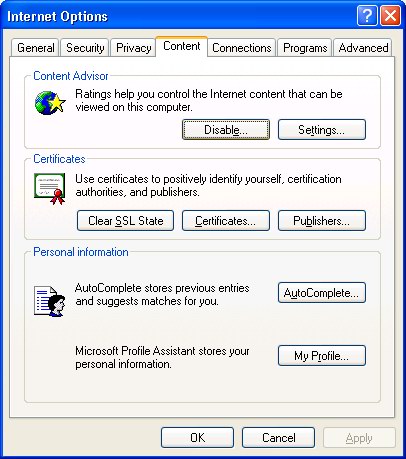
The Microsoft Knowledge Base reveals that the option to save target as is greyed out and not available if you have the Content Advisor enabled in Internet Explorer. Normally, if you right click on a link you can choose to save or Print the file. But with the Content Advisor turned on, these options are not available to you because it would bypass the Content Advisor.

So to Tools->Internet Options->Content

Disable Content Advisor.

thanks also 2 HuhuFruFru. ;)

THANKS!!!!!!!!!!!!!!!!!!!!!!!!!!!!!!!!!!!!!!
I thought I have to buy a new computer.
Thanks again and again for your advice.

when i want to save a link" Save Target As" is always disabled when I try to use it on a link. please what can i do to make it enable?..

Be a part of the DaniWeb community

We're a friendly, industry-focused community of developers, IT pros, digital marketers, and technology enthusiasts meeting, networking, learning, and sharing knowledge.