ok so I have recently installed a netgear router to my dell computer and the wireless laptop automatically detected it. The labtop's internet works perfectly. The normal computer that has the modem and router connected to it does not work. I would greatly appreciate any help.

Dani AI

Generated

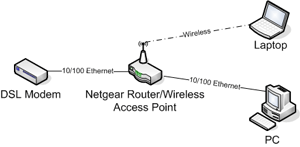
This thread and the topology sketch from are a good start. Below is a compact, practical checklist and brief explanations that address why a wired PC can lose Internet when a router is introduced, and what to try next if the problem returns.

  • Check LEDs and cables first. WAN/Internet and the LAN-port LED should light when the modem and router are linked. Test the same cable and router port with a laptop or known-good device to rule out a bad port or NIC.
  • Verify IP addressing on the desktop with ipconfig /all. An address like 169.254.x.x means the PC did not get a DHCP lease. If there is no default gateway, the desktop cannot reach the router.
  • Power-cycle in order: modem (unplug 20–30s), then router, then PC. Many modems bind to the first MAC they see; doing this forces the modem to accept the router. If the ISP requires PPPoE credentials, configure them in the router (not on the PC).
  • If the ISP binds by MAC address, either clone the PC MAC into the router or reboot the modem after the router is connected.
  • Check router settings: WAN should show a public or routable IP, DHCP should be enabled on the LAN, and LAN/WAN subnets must differ. Update router firmware and driver for the PC NIC if needed.

If the desktop later works with the router removed, the likely culprits are DHCP/PPPoe or MAC-binding at the modem. For a stable setup, keep the modem connected to the router’s WAN, confirm DHCP on the router, and secure the router admin account after setup.

Recommended Answers

All 6 Replies

Member Avatar for Member #33065

What model router are you using?

the cheapest netgear router

Recently i removed the router and without it my internet works just fine so im not sure what the problem is

Member Avatar for Member #33065

First, make sure that the DSL Modem is connected to the router and not your computer.

ok first off thanks for the help my router was previosly connected to the modem and then from the comp to the router aswell. But now i have the router simply placed into the electricity and both work great!

Member Avatar for Member #33065

I'm glad everything is working for you. I've also attached a diagram that should show you the correct topology (network setup) for your purposes. If everything is set up the way it is in the diagram, then your golden. If not, then you might want to reevaluate it.

Cheers.

Be a part of the DaniWeb community

We're a friendly, industry-focused community of developers, IT pros, digital marketers, and technology enthusiasts meeting, networking, learning, and sharing knowledge.