Hi,
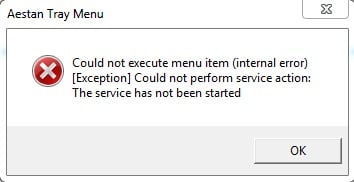
i am begginer in web programing...i have install wamp and i have use it for some day but last day when i wanted to access on desktop appear a messagge like in photo,
wamp aestan tray menu

i am waiting fot your answer,
br Eda

Dani AI

Generated

Quick, focused checklist to diagnose the WAMP tray/menu problem reported by (and to build on 's firewall/restart idea). These steps are version-agnostic and work on Windows systems years after install.

First, run WampServer as Administrator. Then check which process is using port 80 (a common cause). Open an elevated Command Prompt and run:

netstat -aon | findstr :80
tasklist /fi "PID eq <pid>"

If a PID belongs to IIS, Skype, or another service, stop that service or change its settings so Apache can bind to the port. Next, open Windows Services and confirm the Apache and MySQL/MariaDB services are present and starting. If they fail silently, inspect the Apache error log in the WAMP install folder (wamp/logs or wamp64/logs) for the last 20–50 lines — that usually shows the reason (port in use, permission issue, missing runtime).

Also check for required Visual C++ runtimes for your WAMP build; missing runtimes commonly prevent services from starting. Finally, try both and in the browser and temporarily disable firewall/antivirus to rule out blocking (do this only briefly for testing). If the problem persists, post the exact Apache error-log tail and the netstat output so others can pinpoint whether it is a port conflict, permission problem, or missing dependency.

Recommended Answers

All 3 Replies

wamp aestan tray menu

Do you have a firewall that blocks wamp and can you acess the localhost adress
What color has the wamp icon yellow?

white and red

ok the answer is simple restart all your wamp services if this dosen;t work reinstall it

Be a part of the DaniWeb community

We're a friendly, industry-focused community of developers, IT pros, digital marketers, and technology enthusiasts meeting, networking, learning, and sharing knowledge.