Having some issues with securing my home FTP server running FileZilla FTP Server. Basically I was running through the guide on Life hackers guide on how to setup a personal home web server . Regarding the section of locking down directory access from HTTP I did the following.

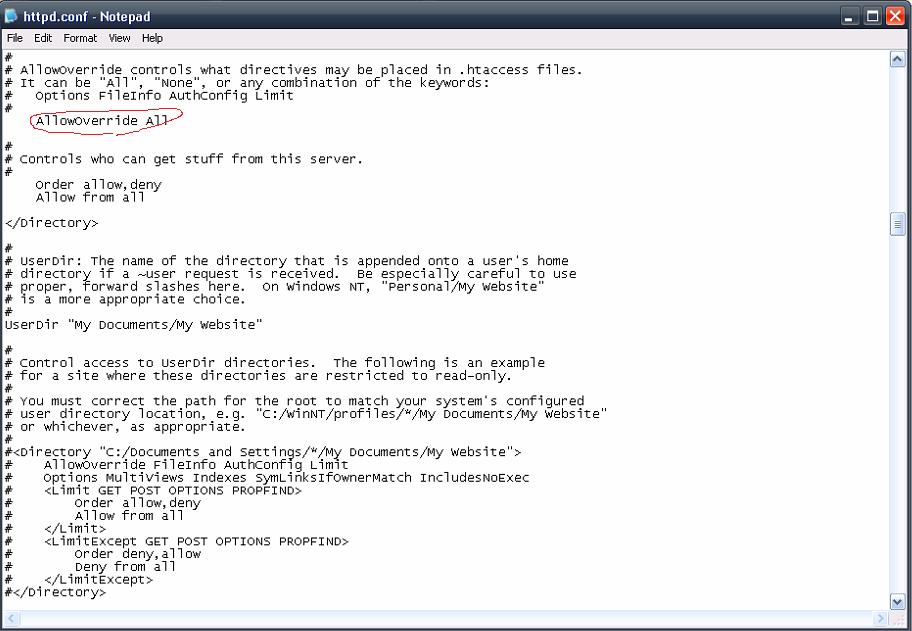
  1. Edited the CONF file of the Apache to AllowOverride All

http://i965.photobucket.com/albums/ae140/omnispectralstudios/CONF_zpsa0d5caba.png

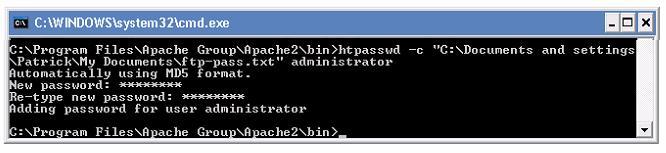
  1. Created the encryption text file using command line.

http://i965.photobucket.com/albums/ae140/omnispectralstudios/cmdline_zps8a17a833.png
http://i965.photobucket.com/albums/ae140/omnispectralstudios/passfile_zpsdc0c938e.png

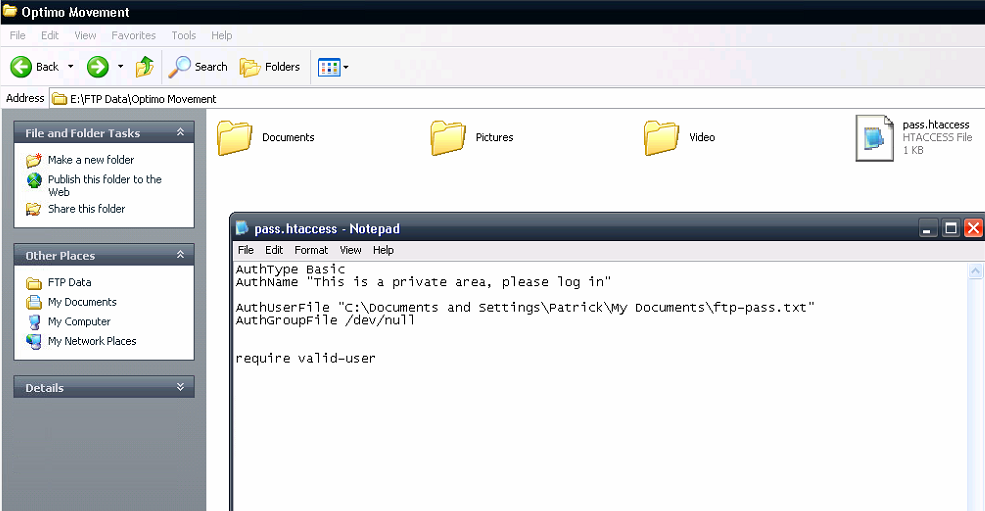
  1. Created the .htaccess file using notepad and placed in the directory that was live on the HTTP end

http://i965.photobucket.com/albums/ae140/omnispectralstudios/Directory_zpsf6730d59.png

But when I access my web server through HTTP I get no password prompt and just the standard directory listing. I see the .htaccess file extension as well (which I'm not sure is correct or not).

http://i965.photobucket.com/albums/ae140/omnispectralstudios/Index_zps49764205.png

Sooo what exactly am I doing wrong here? The instructions are pretty straight forward so I doubt I missed a step. The thing is that I really need to lock down these directories with as much security as possible. Additional advice from seasoned FTP vets are very welcome.

Dani AI

Generated

Good summary from — the immediate cause in this thread was the misnamed file (Apache only reacts to a file named exactly .htaccess). On Windows, Notepad commonly hides extensions or appends .txt, so a visible pass.htaccess or .htaccess.txt will be served as a regular file and no HTTP auth will be applied. Moving the auth into the server/vhost context is the safer option (better performance, easier to keep secrets out of FTP-visible folders).

Immediate checklist (diagnostic + low-effort fixes):

  • Confirm the auth file names are exactly .htaccess and .htpasswd (Explorer must show extensions; saving with quotes in Notepad — e.g. ".htaccess" — prevents .txt from being added).
  • Put the password file outside the web/FTP document root and use an absolute path in the auth configuration so it cannot be downloaded.
  • Verify Apache can read the password file but FTP users cannot: set NTFS permissions so only the Apache service account has read access.
  • Ensure the auth modules are loaded and the Apache config is valid; typical tests:
    httpd -t
    httpd -M   # (or apachectl -M on Unix)
  • Check Apache error_log for messages about access files or auth failure; that log usually points to the root cause.

Security best practices to add to the thread: prefer placing auth directives in the virtual host or main server config (not per-directory .htaccess) to keep sensitive paths out of FTP listings and to avoid the performance hit of per-request .htaccess parsing. Disable directory listings entirely (Options -Indexes) or at least hide .htaccess from index output (IndexIgnore .htaccess). Use HTTPS for Basic auth (or use digest/other stronger schemes) because Basic transmits credentials in a trivially decodable form. For the FTP side, require FTPS or SFTP, disable anonymous logins and jail users to specific folders.

Tie-in: ’s workflow worked once the filename issue was fixed; combining that fix with ’s recommendation to move auth into the vhost, plus the permission and index controls above, produces a much safer setup for serving FTP directories over HTTP.

Recommended Answers

All 5 Replies

Hi,

the .htaccess file is used for HTTP connections, not for FTP access. The article in LH talks about HTTP Authentication: when you open an URL it appears a prompt that asks for username and password, those specified in .htpasswd. If Apache is properly configured then the HTTP access will be limited to the DocumentRoot of the server, but an FTP user will have complete access unless you don't jail it to a specific path (i.e. directory).

In order to secure your FTP server follow these instructions:

There is an example that explain how to add users to Filezilla Server, those users will be able to access your server. Disable also anonymous access, i.e. remove the anonymous user.

"the .htaccess file is used for HTTP connections"

But this is an HTTP connection. Im navigating to these directories by web browser, not by an FTP client. The FTP end is already moderated by user accounts.

Apache is hosting the web server and using my WAN address as the FTP directory address on HTTP. I've delegated the directory shown in the above picture in Apache as the Documentroot so thats also working properly. As far as I can tell it everything is configured - minus the HTAccess not working.

The guide you have given me is for setting up the FTP server for FTP connections using a client, which I have already done. I'm more concerned on the HTTP side of things.

Having some issues with securing my home FTP server running FileZilla FTP Server.

Ok, sorry I was confused by the above.

The name of the file must be .htaccess not pass.htaccess. This is a filename which starts by dot. Otherwise it will not be considered by Apache.

Instead of using .htaccess that can be edited by a user accessing through FTP, you can apply these rules in server or virtual host config, in the Directory directive:

<Directory "E:/FTP Data/Optimo Movement">
    AllowOverride All
    AuthType Basic
    AuthName "Restricted Area"
    AuthBasicProvider file
    AuthUserFile "C:/Document and Settings/Patrick/MyDocuments/ftp-pass.txt"
    Require valid-user
</Directory>

The AuthGroupFile is not mandatory, so, if you don't use a file to identify groups, it can be removed.

When you have finished reload Apache and it should work fine.

Thanks that worked! I didnt realize you could not give the .htaccess a file name.

I'm actually more interested in your alternative since I agree that I do not like how you can see the .htaccess file on the FTP listing.

When you say directory directive on the virtual host config, are you referring to the CONF file in the apache folder here? Click Here

I do not like how you can see the .htaccess file on the FTP listing.

The .htaccess files are usually available to the clients so they can apply some rules to their websites, as url rewrites, or restricted areas. But if you apply an authentication method for your users, then it's better to apply it in the Directory context.

are you referring to the CONF file in the apache folder here?

In your case probably yes, I'm not used to Windows setups. In Linux environments the Apache configuration files are usually splitted in:

  • few server config files: httpd.conf, apache2.conf and modules files
  • and many virtual host config files, one per each domain

the firsts are general for all the websites, the others are specific to each website. When Apache loads the configuration will merge all these files. The different areas of this flow is identified in the Apache documentation by the context directive:

In fact, if you look at the Apache core documentation, you will see for each directive the context in which this can be applied. Check the previous post link to the Directory directive, for example.

Note: In your screenshot I see:

<Directory />
    # rules
</Directory>

Keep in mind that / stands for the root of the system, in Apache this is called ServerRoot, you should define a DocumentRoot and setup the Directory to point the same path, something like:

<VirtualHost *:80>

    # other rules

    DocumentRoot "E:/FTP Data/Optimo Movement"

    <Directory "E:/FTP Data/Optimo Movement">
        AllowOverride All
        AuthType Basic
        AuthName "Restricted Area"
        AuthBasicProvider file
        AuthUserFile "C:/Document and Settings/Patrick/MyDocuments/ftp-pass.txt"
        Require valid-user
    </Directory>
</VirtualHost>

I see the DocumentRoot is already defined, so change the Directory directive, otherwise who opens the website can access the entire filesystem.

Note a part: in the virtual host files you can also setup more than one domain, for example domain.tld and sub domains mail.domain.tld, images.domain.tld. Or as in Windows you can use the main configuration file where you setup many <VirtualHost *:80> blocks. It's a flexible solution.

Be a part of the DaniWeb community

We're a friendly, industry-focused community of developers, IT pros, digital marketers, and technology enthusiasts meeting, networking, learning, and sharing knowledge.