I normally begin reviews with some background of the company or product I’m writing about but in this case let me say: every I.T. professional, programmer, developer, digital artist or person that carries their data and files around on a flash drive or disk needs an Imation Defender Biometric product. Personally, I keep and carry certain files on me at all times. I have an SD card in my wallet and a USB flash drive in my jacket always. I am always backing up important files that I am working, lists of passwords and accounts, code from websites I am developing and my favorite photos. My two biggest fears are: what if my flash drive fails and I lose my files and worse yet, what if my flash drive gets lost or stolen. The first one is easy, I always backup my important data and keep these files on more than one drive. In most cases I have copies on the PCs I am moving files between. The second problem is a nightmare. If I lose my flash drive and someone gets a hold of it they will have access to all of my files, I’m dead.The Nightmare Is Over The digital storage experts at Imation have created a line of . Among the recent entries into Imation’s Defender family of products is the , a USB flash storage drive with built-in ergonomic swipe finger sensor. It meets government and military security standards including and includes hardware-based 256-bit AES encryption, implemented in Cipher Block Chain (CBC) mode that is activated every time you plug in the USB drive and try to use it.
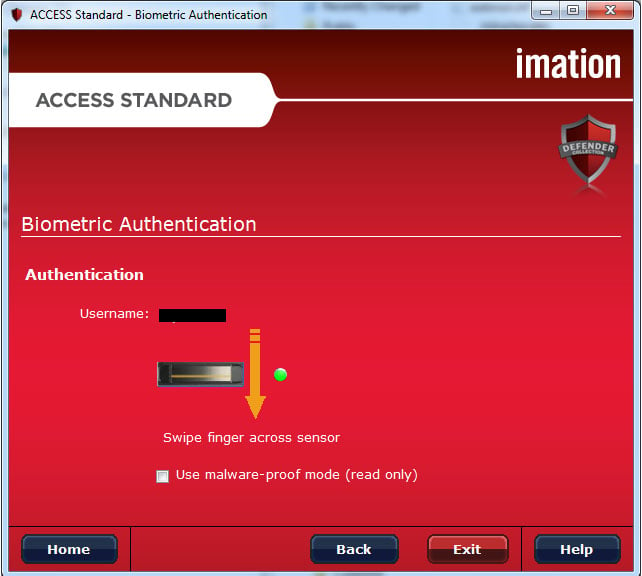
Ultimate Protection The F200 provide “Two-factor Authentication” which allows you to create both password and fingerprint Identification. You can create an optional Administrator password that allows you to manage users, settings and partitions on the drive. The drive’s Access Standard application [include] makes it possible to manage up to 10 users, create custom password policies including length, special characters and expiration. By utilizing the biometric fingerprint sensor with hardware-based matching you can make access truly personal. Each user can enroll up to two fingers. Optional, on-board antivirus software can protect against viruses, worms, and other malware threats by constantly monitoring file transfers.
Design and Function
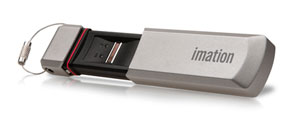
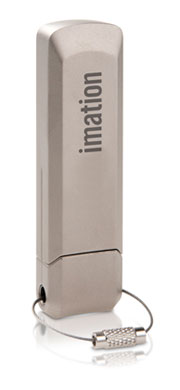
The device enclosure is tamper-resistant and comes encased in a lightweight, yet rugged metal case. To access the USB connector and finger-swipe sensor you simple remove the metal cover that clicks in and out of place like a cap. There is a thin, rubber gasket that acts to seal the device when capped, making it waterproof and dustproof. It also serves to protect the device from accidental drops.
Using this product could not be any easier. After a quick enrolment of a user and fingerprints all it takes to access files is a quick swipe of the finger. When you first plus the drive in the access software auto-runs revealing a login screen. No files are accessible at this point. Once a user is authenticated a new drive letter becomes available and files can be accessed. In my case, my PC’s anti-virus software prevented the F200’s access software from running. No problem there, since authentication is hardware-based, no software is needed to log in. I was still able to swipe my finger while the green light was flashing and gain immediate access to my files. Dollars and Bytes As of the published date of this review the Imation Defender F200 Biometric Flash Drive is available is seven capacities ranging from 1GB for around $100 to 64GB for around $900. The unit I tested was the 16GB valued around $250. Other available capacities are 2GB, 4GB, 8GB and 32GB.
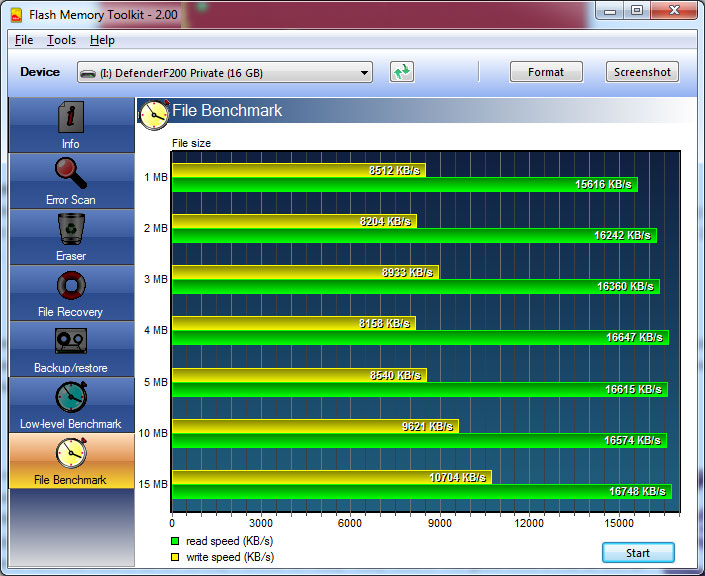
Performance The 16GB unit we tested produces respectable performance benchmark results using Flash Memory Toolkit , version 2.0. We saw greater than 16MB/s read speeds and close to 10MB/s write speeds across multiple file sizes. This is on par with most leading flash drives currently on the market. Actual screenshot below: Conclusion
This device is a must have for those who are concerned with protecting the files they carry on the go. I believe all professionals such as I.T. folk, consultants, digital artists and such should own one. The design is clean, strong and pretty much perfect for a product of this kind. There is a down side however. Unfortunately, at the time of this review the price is too steep for many of us out there. For that reason alone I gave it a 9 instead of a perfect 10. It is a product that we all would love to have, but most of us will not buy it unless we really, really need it. The good news is that as with all of tech, prices do come down over time. All things considered, I highly recommend it.