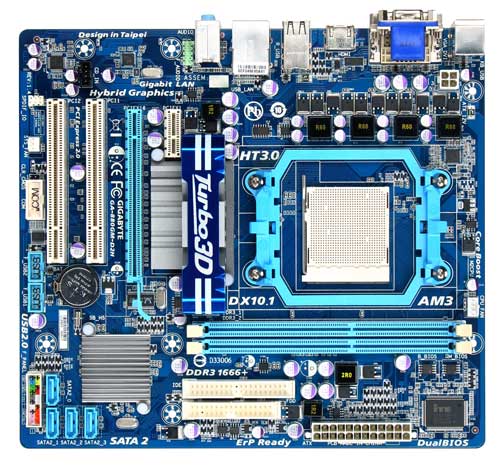
Picture of my Mother board

As you can see, on the bottle left of my motherboard there a bunch of different colored pins. I know my power button plugs in somewhere around there. However, I don't know where.. D: Can someone please tell me where more specifically? My power button chord is only 2 pins.

Dani AI

Generated

A practical, no‑nonsense guide for the photo in this thread: the small cluster of colored pins at the lower edge is almost certainly the front‑panel header. The two‑wire case power switch plugs into the two pins on that header labeled something like PWR_SW, PWRBTN, PW or similar. A mechanical momentary switch is non‑polarized, so the connector can be fitted either way.

  • Power down and unplug the PC before moving connectors.
  • Locate the front‑panel header by reading the silk‑screened label near the pins (common markings: F_PANEL, FRONT_PANEL, JFP1 or PANEL).
  • Find the case cable whose plastic shroud is marked POWER, PWR, PWR SW or POWER SW and push it onto the two pins marked for the power switch. Orientation does not matter for that switch.
  • If labels are missing and you must identify the pair, you can test briefly by momentarily shorting the suspected two pins (with PSU plugged in and switched ON) — only if you are comfortable and careful. Use an insulated tool, touch the two pins only, and avoid touching nearby components.

If the board still won’t start, confirm the ATX 24‑pin and CPU 4/8‑pin power cables are fully seated and the PSU main switch is on. Power LEDs are polarity‑sensitive (swap their connector if the LED does not light), but the power switch itself never needs polarity. As suggested, the fastest way to be 100% certain is the exact motherboard model (usually printed on the PCB) and the vendor manual, which give the definitive front‑panel pin map.

Recommended Answers

All 2 Replies

Can you confirm the exact motherboard model please.

Also, do you not have the manual that came with the board?

Be a part of the DaniWeb community

We're a friendly, industry-focused community of developers, IT pros, digital marketers, and technology enthusiasts meeting, networking, learning, and sharing knowledge.