i have a drive connected to my computer through a cable adapter, i can see it in the device manager but cannot see it in my computer, i cannot format this due to trying to recover data from it. it has no OS was used for NAS. what am i doing wrong?

Dani AI

Generated

Short diagnosis: if Windows Device Manager sees the disk but Explorer does not, that usually means Windows can’t mount the partitions — common with NAS drives (Linux filesystems, LVM or software RAID), a damaged partition table, or encryption. ’s drive-letter idea is good to check early; since you’ve already found no letter and most options are greyed out (as reported), the problem is more likely an unsupported filesystem or array/metadata Windows won’t touch.

Immediate caution: do not initialize, format, or create a new partition on that disk. Creating a partition now (as suggested by ) or letting Windows “fix” the disk risks overwriting recoverable data. Treat the disk as read-only until you have a safe image.

Recommended non‑destructive workflow (high level):

  1. Make a sector‑by‑sector image of the whole drive to another disk/storage before attempting recovery. A common, non‑destructive tool is GNU ddrescue; an example invocation is shown here (replace device and paths to match your system):
sudo ddrescue -f -n /dev/sdX /path/to/recovery-image.img /path/to/recovery.log
  1. Work from the image, not the original. Boot a Linux live USB and inspect the image or device with tools like lsblk -f, blkid or TestDisk/PhotoRec to identify filesystem type and recover files. If the disk came from a NAS, check for RAID/LVM metadata — that usually requires assembling the array (or examining metadata) before files are mountable.

If the drive is noisy, has SMART failures, or the array/metadata looks complex, stop and consult a professional data‑recovery service. Imaging first preserves odds of a successful recovery.

Recommended Answers

All 5 Replies

I am going to go out on a limb and guess maybe it has been given the same drive letter as another drive on your PC, maybe go into to drive management and see if the drive is there and what letter it may have, from there you can change the drive letter by right clicking it and clicking change drive letter. That is just a guess but have had that happen to me before.

Larry

Thanks Larry, there is no drive letter for that drive and right clicking in that area all i get is shaded out choices except delete.

Worth a try....maybe go for a data recovery tool and see if they can map to it through another method. I used to use a german tool which was free and very good, but I cannot find it in my email to let you know which it was. Maybe try these guys... http://www.piriform.com/recuva/builds hopefully it will see the drive's files and be able to bring them back for you.

Hope that helps a little, a lot of times these tools can mount to the drive at a lower level and can see drives windows does not see.

Larry

It may not be an NTFS or FAT/FAT32 partition. Open a cmd window and type the following:

diskpart
DISKPART> list disk

by looking at the size figure out which disk # you are interested in.
Example: (I've decided I'm interested in disk 1)

DISKPART> select disk 1
DISKPART> detail disk
DISKPART> list partition

For each partition do the following:
DISKPART> select partition <partition #> where <partition #> is "0", "1", "2", ...etc

Example:

DISKPART> select partition 0
DISKPART> detail partition

Then if there is a partition 1:

DISKPART> select partition 1
DISKPART> detail partition

...and continue for each partition. Make note of the "type" for each partition.

DISKPART> exit

yes that's also how the software called "disable usb" by intelliadmin work .
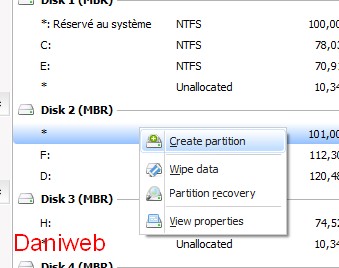
it disable the drive letter so it won't show up , i solved this problem using easeus pratition master 9
right click on the partition that won't show up and choose create partition

Be a part of the DaniWeb community

We're a friendly, industry-focused community of developers, IT pros, digital marketers, and technology enthusiasts meeting, networking, learning, and sharing knowledge.