Someone borrowed my Seagate 500mb Portable HDD and then suddenly the only thing I can see in it is a shortcut of itself. My portable hdd is divided into 200mb and 300mb, both is the same.

I tried to show all hidden and system files and here is what i see.
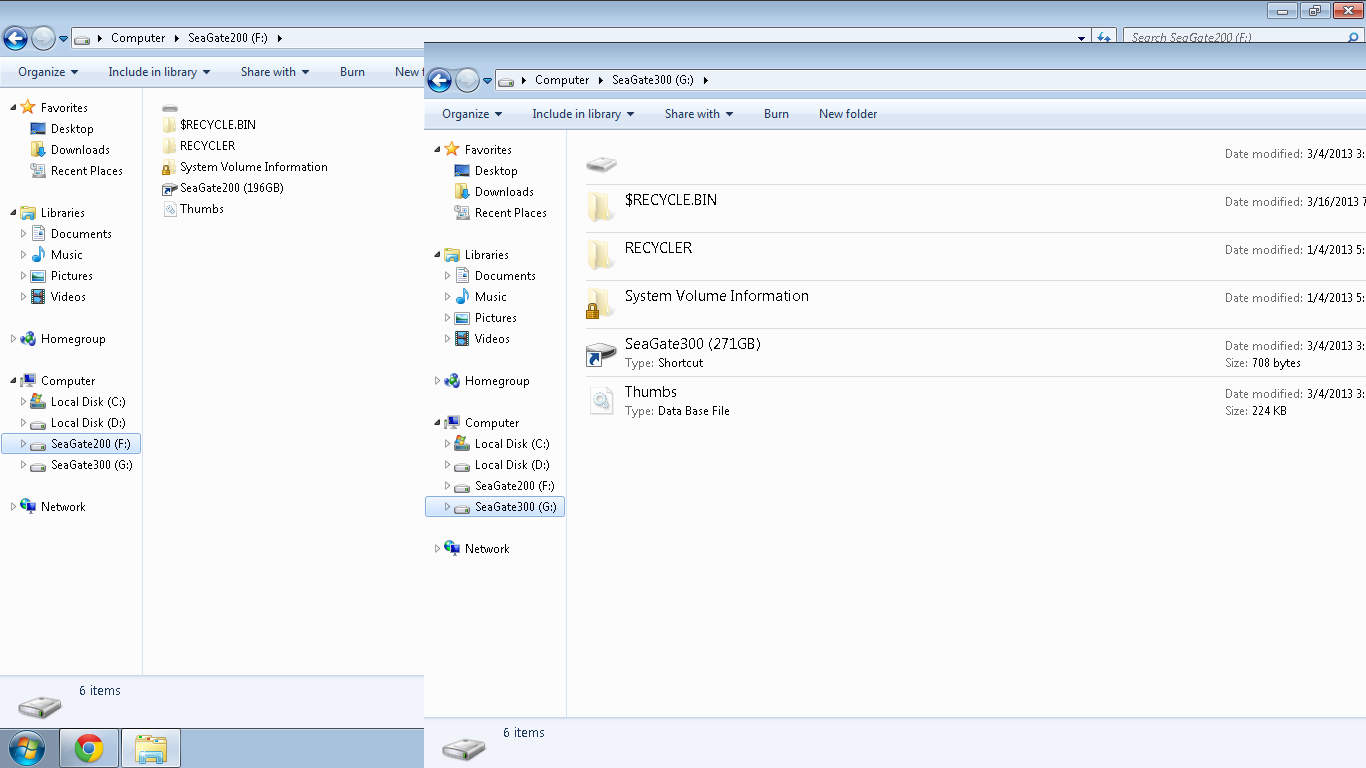
b35747ccea72d629a72b35307a6b7760
Please help me clean my HDD and restore the files inside.

Thank you!

Dani AI

Generated

A few practical steps and clarifications for and anyone seeing the same “shortcut-only” symptom. Treat the drive as potentially infectious: do not open any shortcut files or run anything from the HDD. Work from a safe, isolated environment (a Linux live USB or a VM) or use a hardware write‑blocker so you don’t further modify the device. Imaging the drive before trying repairs or recovery is the single most important step — it preserves a copy you can retry on if a tool makes things worse.

Create a sector image and work from that image. On Linux a reliable workflow is to use GNU ddrescue to copy the raw device to an image file, for example:

sudo ddrescue -f -n /dev/sdX ./portable.img ./portable.log

Replace /dev/sdX with the device node and store the image on a separate physical disk with plenty of free space. Never recover files back to the same failing drive.

Try repair-first tools against the image (TestDisk can rebuild partition tables and restore file listings). If filesystem repair fails or files are fragmented/corrupt, use a file‑carving tool (PhotoRec) on the image to extract file content without relying on the original filesystem. Both tools operate on images and are safer than repeatedly writing to the original drive.

Regarding ’s Active Undelete issue (files > ~71MB failing): that error commonly indicates read errors, fragmentation, destination filesystem/space limits, or a tool limitation. Check enough destination space and use an NTFS/exFAT target (not FAT32); if read errors persist, carving (PhotoRec) may recover usable copies even if names and folders are lost.

After recovery, fully wipe and reformat the portable drive (or replace it if SMART/badblocks show hardware faults), then scan recovered files on a clean system with updated anti‑malware before using them. For future safety, keep at least one offline backup and avoid lending writable media — a point echoed by and .

Recommended Answers

All 4 Replies

I don't hang out here, so I won't be able to get into a discussion about fixing this (see if the Seagate site has recovery software), but if and when you do get it fixed, get another external HD (bigger ones, up to 3 TB, USB 3.0, are down to $120 on sale [www.NewEgg.com, Costco] - [www.bensoutlet.com has a bunch < 1 TB cheap right now too]) and keep the 500 GB as a loaner to put stuff on for others to take and copy stuff from, or visa versa (like a large flash drive). Get two larger ones so you can keep everything backed up (AllwaySync free version is good and easy to set up and use).

Try recovery software that locates lost partitions. I can't recommend any, as I haven't lost any partitions, but try www.techsupportalert.com for free software, and google around for reviews and tests of the specific software before you use it, as I've read that it is possible to permanently lose the partitions if the software is bad.

You can try removing the shortcut you see in the root of the F: and G: drives. It is also possible that just mounting the drive on your system has infected it as well. Do run advanced A/V and Anti-malware scanners on your system now. Whether or not you can recover any of your data remains to be see. FWIW, I NEVER lend my hard drives to others. When I lend them a thumb drive, I wipe it completely, and create a new boot sector on it with a Linux system before I remount it back to my Windows environment.

Yes, I'm using Active Undelete FULL version and it was able to show me all the files from M to Z. I'm able to retrieve them but the only problem is any file larger than 71.44mb ends in "error" and I can't save those files.

chech up by a good anti-virus softwarre

Be a part of the DaniWeb community

We're a friendly, industry-focused community of developers, IT pros, digital marketers, and technology enthusiasts meeting, networking, learning, and sharing knowledge.