I'm working from a powerbook operating OSX and I've not been able to log into MSN Messenger for Mac since I installed it (several times, mind!). This has been about two months.

MSN have been spectacularly unhelpful over this two month period, taking at least a week or two to respond to each query/reply to their suggestions. None of them has worked.

I've tried uninstalling, reinstalling, clearing, everything! The error I get is that my user name or password is incorrect but I know absolutely this is wrong because a) I can sign in on other computers and b) I can still sign in to Hotmail on my Mac.

Help! Please?

Dani AI

Generated

This thread documents the classic “Service is not available / wrong username or password” failures for Messenger for Mac that many saw between 2006–2010. Posts from , , , and show common quick fixes (alternate clients, clearing account history, temporary simple passwords) but do not always explain why. The checklist below focuses on safe, non-destructive diagnostics and deeper cleanup steps that the replies in the thread did not fully spell out.

  1. Confirm system clock and time zone (Date & Time) — SSL/TLS authentication can fail if the Mac’s clock is wrong.
  2. Test a different network (phone hotspot or another Wi‑Fi) to rule out router/NAT/firewall interference; disable any proxy settings in Network preferences.
  3. Create a fresh macOS user account and try signing in there; a success isolates the problem to the original user profile.
  4. Use Keychain Access to find and remove saved credentials for Messenger/MSN/Passport, then relaunch the app.
  5. Back up and then remove per-user Messenger data: check ~/Library/Application Support and ~/Library/Preferences for items with “Messenger” or “MSN” in the name, then try a clean reinstall.
  6. Monitor Console.app while attempting sign-in; logged errors often identify DNS, TLS or proxy rejects.

Additional notes and cautions: always back up Keychain and preference files before deleting them. Editing system files (for example /etc/hosts) or resetting network equipment should be done carefully. The special-character password problem noted by can sometimes reveal an encoding or client-side handling bug, so testing with a temporary ASCII-only password is a diagnostic step only—not a recommended long-term change. Because server-side auth and protocols have changed over time, older Messenger clients may become incompatible; when diagnostics point to protocol/authentication failures, switching to a maintained client or web service is the practical long-term solution.

Recommended Answers

All 17 Replies

Anyone? Please?
Should I post this in a different thread?

I'm working from a powerbook operating OSX and I've not been able to log into MSN Messenger for Mac since I installed it (several times, mind!). This has been about two months.

MSN have been spectacularly unhelpful over this two month period, taking at least a week or two to respond to each query/reply to their suggestions. None of them has worked.

I've tried uninstalling, reinstalling, clearing, everything! The error I get is that my user name or password is incorrect but I know absolutely this is wrong because a) I can sign in on other computers and b) I can still sign in to Hotmail on my Mac.

Help! Please?
just wondering, have you tried adiumx

would it be possible when someone with experience on this subject to post a reply as to a fix, I have tried ADIUMx and Mercury and Fire and MSN Messenger MAC and none will allow internet connection trough, thank you for taking a moment of your time to read and consider that we I am new at MAC and no support is provided for MSN MESSENGER MAC anywhere i just get tossed around, it be nice to receive a solution from the pro's here, cheer

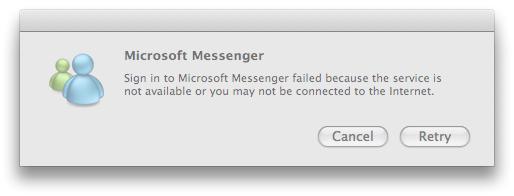
im having the same problem, except mine says im not connected to the internet or the service is not avaiable sometimes too. any1 know what this is about?

The only plausible answer i can suggest is do what I did, re-install MAC OSX and do your updates, after install your messenger and yahoo, it worked for me, I still cannot login into my mac account, but that is fine for now, good luck

im having the same problem but i has been really abrupt. it says that the server or internet is connected but it is. i dont no what to do. any ideas?

i have tha same problem...i dont know what to do..

It's pathetic really, but hey ho!. I had the same problem - just won't let me in. As I always use alternative characters in my passwords (# or @ or whatever) it occurred to me to change my password to something really banal and simplistic as a test - you know, 1234abcd etc. I tried various combinations and, sure enough, they ALL worked. Using a password consisting of only numbers or letters, the portals to the messenger:mac opened wide. Solution? Use a password a monkey could figure out. Advice? Erase this crap and move on ;-)

I am having the same problem ('Service is not available or you are not connected to the Internet') on OS X (Leopard) when, in fact, I am connected to the Internet: A wait time of about 1-3 minutes (it varies) and the the message, as shown in the attached graphic. This happened once before some months ago. At that time, uninstalling v 6.0.3 and reinstalling it worked. No problems until tonight. However, that old solution does not work now. Moreover, trying to access the "Server Status" page results in an inordinately long wait (5 min?) until a time-out occurs. Anyway, it's been 4 hours now and still not able to long in -- so I am at my wits end. Incidentally, my password only has alphanumeric characters in it.

i have also this problem can you tell me if u have fixed it and what's the solution?

Member Avatar for Member #175961

I'm a new user of Mac OsX, that problem happened with me, but it only happened when i tried to figure Mail Program that's supported by Mac System, but if u didn't configure the Program MSN messenger will work for ever

hi I have the exact same problem and have tried all the suggestions nothing for adium or msn. if i find anything ill post it up

I'm having the same problem. ALthough things worked better with the older version of MSN Messenger 7.0 but only one of my hotmail ids doesn't sign on on msn messenger 8.0 on my MAC...it works in Mail, Hotmail on the web, Windows live messenger on any PC but not on the MAC; and no luck in support either. Which version are you guys having problems with??

I'm having the same with both the old previous version and the new version. The old version worked for a while until last week it stopped working. Than I downloaded the new version 8 and still the same problem. Well the old version I had on was the Messenger 8 beta at the time. Might try to download the older version to see if that will work.

OK so after much searching I found the solution. Here ya go:

TO SOLVE THE PROBLEM IS VERY SIMPLE.
There is an error with your current account history log.

To fix the problem open messenger,
1)Go into sign in with a different account and click, the clear account history button.
2)Then exit and restart messenger.
3)When messenger restarts it will open a Personal contacts and corporate contacts window
4)Enter your desired messenger address into the Personal contacts window and it should log in.

commented: Thank you!! This was the only solution that worked after days of frustration! +0

A couple of years ago I used MSN for Mac, the "official" version is 7.0.3, but it gave me the same problems described here, so I tried the beta 8.0 version (it's supposed to support videochat but I never tried it). 90% of the time it worked fine; I tried Addium X for some time, but finally I moved to aMSN (an open source clone for MSN).
Everywhere I looked, they reci¿ommended moving away from MSN and trying something else.

I did something like Digitalvox said:

1. cleared the account history
2. uninstalled messenger
3. logged off my e-mail account
4. reinstalled messenger

And now it's working!

Be a part of the DaniWeb community

We're a friendly, industry-focused community of developers, IT pros, digital marketers, and technology enthusiasts meeting, networking, learning, and sharing knowledge.