Hello All;

I have put together some Win7 Themes for myself and I thought I would share them with you.
All themes contain no less than 6 wallpapers. All wallpapers are in 1024x768 resolution.
Hawaii contains 12, I couldn't stop:D
To install them, just download the zip and extract it to your "My Pictures" folder. Next, click Start/Control Panel/Change Desktop Background and browse to the folder you placed in "My Pictures" expand the MCT folder and click on the country, save settings and close.
Next, right click desktop, click "Personalize" and right click the new theme to save it with the country's name.
NOTE: Germany(MCT-DE) and Japan(MCT-JP) have self installers, click on the themes file inside each Themes folder to activate the themes.

I hope you like them.

http://www.filefront.com/14557441/MCT-AR.zip/ Argentina
http://www.filefront.com/14595155/MCT-AT.zip/ Austria
http://www.filefront.com/14595479/MCT-BG.zip/ Belgium
http://www.filefront.com/14466515/MCT-BR.zip/ Brazil
http://www.filefront.com/14103329/China.zip/
http://www.filefront.com/14052397/MCT-DE.zip/ Germany
http://www.filefront.com/14466521/MCT-EG.zip/ Egypt
http://www.filefront.com/14595581/MCT-FR.zip/ France
http://www.filefront.com/14466529/MCT-GL.zip/ Greenland
http://www.filefront.com/14466633/MCT-GR.zip/ Greece
http://www.filefront.com/14466641/MCT-IE.zip/ Ireland
http://www.filefront.com/14466573/MCT-IS.zip/ Iceland
http://www.filefront.com/14052389/MCT-JP.zip/ Japan
http://www.filefront.com/14466585/MCT-NL.zip/ The Netherlands
http://www.filefront.com/14547907/MCT-PT.zip/ Portugal
http://www.filefront.com/14466595/MCT-RU.zip/ Russia
http://www.filefront.com/14466603/MCT-SA.zip/ South America
Scotland
http://www.filefront.com/14547911/MCT-TR.zip/ Turkey

These are some just of the States;
http://www.filefront.com/14524791/Alaska.zip/
http://www.filefront.com/14490427/Hawaii.zip/
http://www.filefront.com/14540115/Montana.zip/
http://www.filefront.com/14524803/NCarolina.zip/
http://www.filefront.com/14557179/SCarolina.zip/
Dani AI

Generated

Thanks to for assembling a large collection of regional Windows 7 theme packs and iterating on them in later posts (note the MCT-BG correction to Bulgaria). A few practical notes follow to keep the packs useful and safe years after the original uploads.

Older theme archives on third‑party hosts can suffer link-rot or carry unexpected installers. General precautions: scan downloaded ZIPs with up‑to‑date antivirus, open archives and inspect file types before running anything (legitimate theme packages usually contain .themepack, .theme and image files; unsigned .exe files are a red flag), and create a system restore point or test in a VM if running unknown installers. Remember that Windows 7 reached end of support on January 14, 2020, which increases risk when running an unpatched OS. (Microsoft lifecycle details.)

Helpful technical tips (non-destructive):

  • User theme files are stored under the hidden Themes folder in the profile (installed themes and saved .theme files reside in the user AppData Themes folder). For a portable backup of a custom theme, use the Personalization option “Save theme for sharing” to produce a single .themepack file that contains images and sounds.
  • If a background won’t stick or reverts to a solid color, clearing the wallpaper cache often helps: rename or delete TranscodedWallpaper.jpg in %USERPROFILE%\AppData\Roaming\Microsoft\Windows\Themes and clear slideshow.ini, then reapply the theme. This approach is commonly recommended for Windows 7 wallpaper cache issues.

References:
Windows 7 end‑of‑support FAQ
Where themes live in Windows 7 (user Themes folder)
Fix: clear TranscodedWallpaper / slideshow.ini to repair stuck backgrounds
Windows blog: Save theme for sharing / .themepack explanation

EDIT: Please take note that MCT-BG is not Belgium, it's Bulgaria.
Sorry for the mix-up, have not completed Belgium yet.

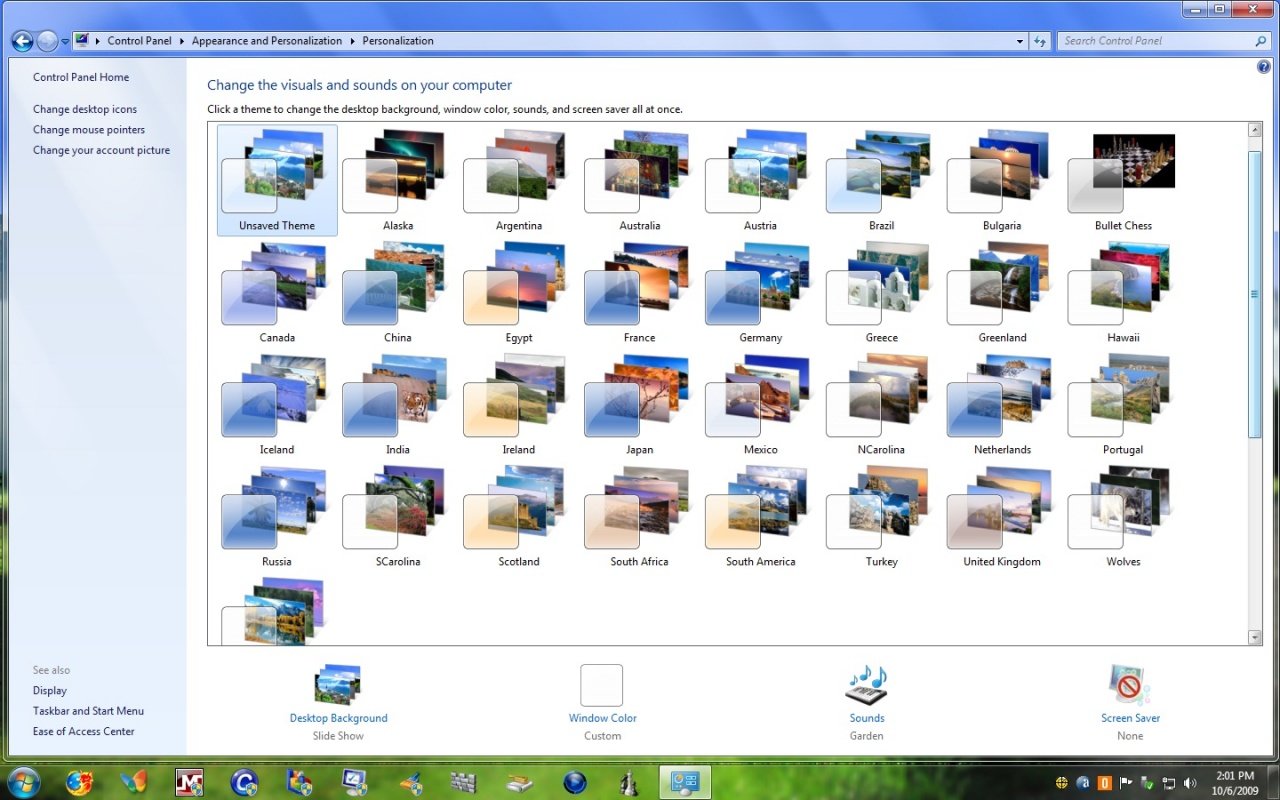
This is a screenshot of "My Themes" folder
There are 33 themes in all.

lol fakes :D
dont think in the meaning egyptian lang dude :P

lol fakes :D
dont think in the meaning egyptian lang dude :P

Would you care to elaborate?

Be a part of the DaniWeb community

We're a friendly, industry-focused community of developers, IT pros, digital marketers, and technology enthusiasts meeting, networking, learning, and sharing knowledge.