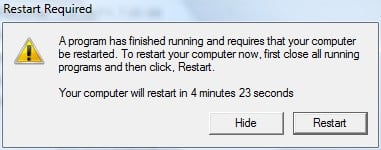
Since last few days, my system has starting to restart every morning sharp at 8:00 AM. I'm shown this message (Attached below) and given 5 minutes to close all apps before restarting. But it's really annoying when that happens everyday! :?: I've no idea, what program finishes running everyday, irrespective of whether I'm connected to the net or not.
I've checked all the possible places, Registry (Windows Run keys), msconfig, services, scheduled tasks, etc. but am not able to make out any suspicious task which might be running that causes this regular restart.
Can someone please help me find out what might be causing this annoying thing?

Dani AI

Generated

A focused troubleshooting path (do these in order) that goes beyond msconfig/startup entries and hidden tasks.

Start with Event Viewer: run eventvwr.msc -> Windows Logs -> System and filter for Event ID 1074 (planned restarts) and 6006/6008/41 (shutdown/power issues). A 1074 entry normally records the initiating process and a reason string — that single line most often tells you which program or service asked Windows to restart.

If Event Viewer is inconclusive, capture a snapshot just before 08:00 so you can inspect what was running when the restart was triggered. Create a folder and run (or schedule to run at 07:58) these commands to dump useful diagnostics:

mkdir C:\Temp\BeforeRestart
tasklist /v > C:\Temp\BeforeRestart\tasklist.txt
schtasks /query /fo LIST /v > C:\Temp\BeforeRestart\schtasks.txt
powercfg -waketimers > C:\Temp\BeforeRestart\waketimers.txt

When the five‑minute dialog appears, abort it with shutdown /a and immediately check the System log: the 1074 entry still shows who requested the restart. If 1074 names svchost.exe or a service, map services to processes with:

tasklist /svc > C:\Temp\BeforeRestart\svchosts.txt

Likely causes to check next: Windows Update/UpdateOrchestrator, third‑party update agents (antivirus, driver/UPS software), SCCM/WSUS, scheduled maintenance tasks under Microsoft\Windows, and BIOS/UEFI RTC wake alarms or wake timers. As , and suggested, autorun/startup inspectors help, but use Event Viewer first so you disable the correct item rather than guessing. Avoid blanket disabling of services — identify the initiator from the logs, then remove or reconfigure that component.

Recommended Answers

All 5 Replies

Have you looked in Start/programs/system information/startup?

Mhh, did you install any software? Check scheduled task whether there is cmd.exe shechedule to run with switches /shutdown /r
Also you can use anvir task manager to see what startup programs are and it alerts you any change doen since previous time

Have you looked in Start/programs/system information/startup?

Yes I've looked at all the startup locations system-wide, but no luck. Can't see any unexpected entry :(

Be a part of the DaniWeb community

We're a friendly, industry-focused community of developers, IT pros, digital marketers, and technology enthusiasts meeting, networking, learning, and sharing knowledge.