Hi guys!

I have a 32Gb corsair SSD which i use for only a few programs and windows. I try to keep it as empty as possible but its gone a bit strange since yesterday.

When i highlight all the folders and files (with hidden files showing)and look at the space used, it only shows a total of 20.9Gb. But the drive is showing only 1.77Gb's remaining?

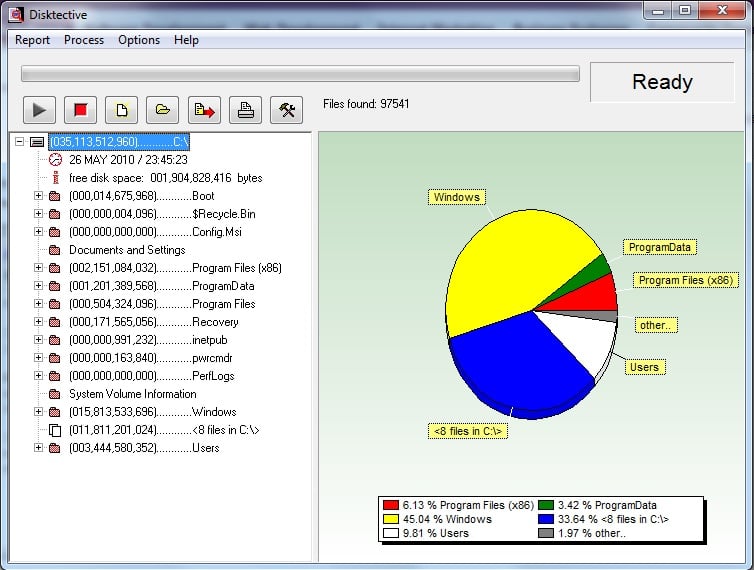
I have disabled pagefile completely and system restore isnt running at all so it cant be either of these. I have run Chkdsk etc etc. I used 'Disktective' to show whats using up all this space and it shows the normal things, but also "8 files in C:/" which is taking up 33% apparantly. These files are nowhere to be seen and I get the feeling they are corrupt maybe.

It was fine and i had 7gb free the other day, and i havent installed anything since so i'm quite baffled.

IF you got any ideas they are appreciated it!
Dani AI

Generated

Good call by and well done to for tracking this down. When Explorer’s visible file totals don’t match reported used space the usual causes are protected system files, shadow storage (volume snapshots), or system-managed paging/hibernation files that aren’t obvious in a normal folder view. The checklist below gives safe diagnostics and fixes that work on Vista/7 and later.

Run an elevated Command Prompt to inspect system allocations:

vssadmin list shadowstorage
vssadmin list shadows
powercfg /hibernate off
fsutil volume diskfree C:
  • The vssadmin lines show how much space Shadow Copy/Restore is reserving and any existing snapshots.
  • powercfg /hibernate off properly removes the hibernation allocation.
  • fsutil volume diskfree confirms what the filesystem sees as free/total.

Care should be taken when removing system files: do not delete protected files directly from Explorer. To remove a pagefile, set “No paging file” in System Properties → Advanced → Performance → Virtual Memory, click Set, then reboot; Windows will remove the file cleanly. To reclaim space used by shadow copies, either use Disk Cleanup (Clean up system files) or vssadmin to prune snapshots. Note that disabling the pagefile or hibernation has trade-offs: crash dumps and hibernation will be unavailable, and systems with little RAM can become unstable without a pagefile.

For quick visual analysis use a disk-usage tool (WinDirStat or TreeSize Free) run as Administrator to reveal large, hidden allocations. On small SSDs leave a healthy free margin (roughly 10–20%) to preserve performance and allow TRIM/GC. These steps explain why hidden system items can remain after changing settings and provide safe, repeatable ways to find and remove them.

Recommended Answers

All 2 Replies

Ahhh yeah I didnt know that option was there! Files were a 6gb pagefile (which had been saved for some reason when i turned pagefile off) and a 7gb hibernation file. I deleted both and got my 14gb back!

Thank you for pointing that out!

Kind regards
Ryan

Be a part of the DaniWeb community

We're a friendly, industry-focused community of developers, IT pros, digital marketers, and technology enthusiasts meeting, networking, learning, and sharing knowledge.