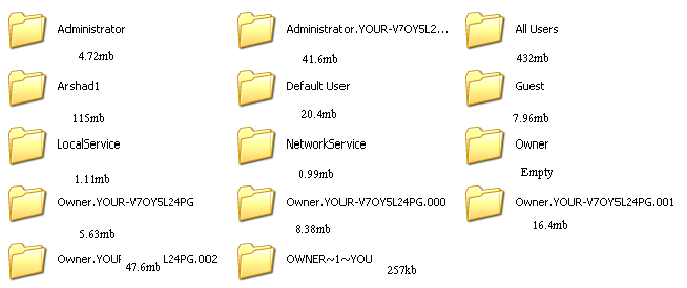
i still got all these files man..
and half ov these are but dont no which 1z to delete coz i ov them is like 1.2gb
so thought someone can help me out here..
i can free up alot of space..lol

take a look at the picture plz

[IMG][IMG]http://img.photobucket.com/albums/v509/rudeboy_56/jhj.jpg[/IMG][/IMG]

Dani AI

Generated

Good instincts from and about protecting data and not deleting things blindly. A methodical approach reduces risk and makes the space-recovery effort predictable.

Quick, low-risk cleanup steps that often recover the most space:

  • Run Windows Disk Cleanup (cleanmgr) and empty the Recycle Bin.
  • Uninstall unused large programs from Add/Remove Programs.
  • Use a visual disk-usage scanner (examples: WinDirStat or a TreeSize-style tool) or sort folders by size in Explorer to find the few items actually consuming most of the gigabytes (installers, video ISOs, old backups). Move large candidates to external storage before removing them.

Safer profile removal workflow (avoids leftover registry traces):

  • Use the built-in User Profiles manager in System Properties (Advanced tab -> User Profiles -> Settings) to remove old profiles cleanly. Archive any important files from an old profile before deletion.
  • Avoid directly deleting profile folders from the filesystem as a first step; that can leave system entries behind.

Other things that often get missed:

  • Old system restore points (use Disk Cleanup -> More Options to prune them).
  • The hibernation file (disable hibernation via Power Options to reclaim that file).
  • Large pagefile or snapshot/image files; consider moving them or keeping a single, compact restore strategy.

Final cautions: run an up-to-date malware scan before mass cleanup, keep at least one verified backup or a disk image before irreversible changes, and hold deleted-but-archived items for a short trial period to ensure nothing critical was lost. When seeking further help, include the single largest folder name and its size (as suggested) so advice can be targeted.

Recommended Answers

All 7 Replies

i still got all these files man..
and half ov these are but dont no which 1z to delete coz i ov them is like 1.2gb
so thought someone can help me out here..
i can free up alot of space..lol

take a look at the picture plz

[IMG][IMG]http://img.photobucket.com/albums/v509/rudeboy_56/jhj.jpg[/IMG][/IMG]

Be more precise: what folder of the ones you've presented contains the most data and how much is it?

sorry mate...look at the updates pic then!!

if you still dont no plz add me on msn or sumfin

Backup any files that are important to you on CDs, create a new user...make that an administrator account. Then, once you log in with that account, a folder will be created in the directory you've been snappin' pics of (most likely c:\documents and settings) with the name you created for the new user...place all important files in this profile's "My Documents" folder (or any place you can remember) and then blow away the other folders in c:\documents and settings.

Hope this helps.

even the guest files???

even the guest files???

isn't the point here to get back hard drive space? if the "Guest" folder isn't taking up a lot of space then leave it. i was just coming up with the most simple way for you to reclaim space without getting too complex into what each of these are. come to think of it you'll probably want to leave the folders called "All Users" "Default User" (if present), "Local Service" (if present) and "Network Service" (if present). Better yet...only delete the extremely large folders...don't forget to make a backup! you make the call, Ruuuuuuuudeboiiii!

i still got all these files man..
and half ov these are but dont no which 1z to delete coz i ov them is like 1.2gb
so thought someone can help me out here..
i can free up alot of space..lol

take a look at the picture plz

Please do us a favor-- if you want to get good help, please speak proper English.

I think antioed is right, though-- back up the files to DVD or CD, just to ensure you don't delete anything important. Log into Safe Mode as Administrator, and then delete all of the folders, except for

  • Administrator
  • All Users
  • Default User

Once you do that, log back in with the user you normally use in Normal Mode. It will recreate your user profile, and you'll have to re-do your bookmarks, email settings, etc.

You might be well-advised to reinstall Windows, though-- no telling whether a virus or some spyware may have caused that.

isn't the point here to get back hard drive space? if the "Guest" folder isn't taking up a lot of space then leave it. i was just coming up with the most simple way for you to reclaim space without getting too complex into what each of these are. come to think of it you'll probably want to leave the folders called "All Users" "Default User" (if present), "Local Service" (if present) and "Network Service" (if present). Better yet...only delete the extremely large folders...don't forget to make a backup! you make the call, Ruuuuuuuudeboiiii!

He's either joking, or he really doesn't know what is the directory tree.

Rudeboy, there is one field (let's call it "C:") and on that field you can plant a lot of trees but, if you cut down some of the large ones all the apples in it go >>SQUASH!!!<<, so first: climb all the trees and see what's up there, pick those apples and put them in a basket (or as antioed says: make a bakup copy of everything that's important on your computer - that easy - so you'll get some space on your hard drive)

Be a part of the DaniWeb community

We're a friendly, industry-focused community of developers, IT pros, digital marketers, and technology enthusiasts meeting, networking, learning, and sharing knowledge.