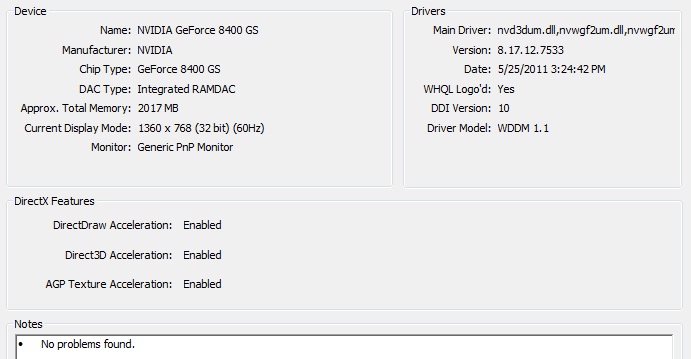
I have a new Windows 7 Ultimate 32-bit PC and I tried installing some games that seemed to be compatible with my PC when I checked their requirements on the internet.

I first tried installing Prototype 2. I've checked the minimum requirements here:

Installed and launched smoothly, but when the first scene comes up, it lags so much I can't even move my character properly.

Then I tried installing Assassin's Creed(the first one) here are the requirements:
http://www.game-debate.com/games/index.php?g_id=18&game=Assassins%20Creed
It's minimum requirements are a lot lower than that of Prototype 2, but I still have the same problem.

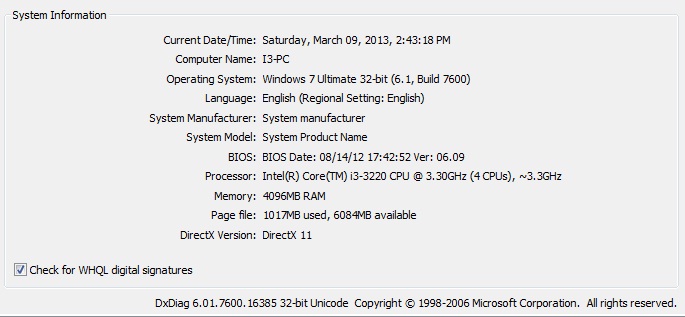
I have 4 GB of RAM and the drivers and DirectX are all updated. Please check these screenshots too for more information about my PC specs:
http://fc01.deviantart.net/fs71/f/2013/068/7/7/specs1_by_jrmcrlmorales-d5xflo0.jpg
and this one too,...
http://fc04.deviantart.net/fs70/f/2013/068/1/7/specs2_by_jrmcrlmorales-d5xflxi.jpg

I think it's something with the NVIDIA dirver settings, or the RAM. I've heard there's something in Windows 7 32-Bit limiting the usable RAM, the performance bad even if the game is actually compatible with your system. I'm not sure of any of these though so please help, thanks!

Dani AI

Generated

Short summary: the lag is almost certainly not DirectX or a Windows “mystery limit” by itself — it's a combination of an entry‑level GeForce 8400 GS (very weak GPU and small VRAM), a 32‑bit OS that limits usable physical/process memory, and likely either the discrete GPU not actually being used or background/resource starvation. is correct that an 8400 GS was never a true gaming card; and was right to suggest checking for infections as a quick baseline.

Quick diagnostics (run these in order):

  • Verify the system is using the NVIDIA driver: Win+R → devmgmt.msc → Display adapters. If you see “Microsoft Basic Display Adapter,” reinstall the NV driver and reboot. Make sure the monitor is plugged into the GPU output (not the motherboard) on desktop systems.
  • Launch the game, then open Task Manager/Resource Monitor and watch CPU, RAM and Disk activity. If CPU is pegged or disk is at 100% while the game stutters, that points to CPU/drive I/O rather than graphics.
  • Check GPU load if possible (MSI Afterburner/GPU‑Z or the NVIDIA Control Panel performance overlay). Low GPU usage with high CPU usage means the CPU is the bottleneck; low CPU and low GPU usually means a driver/adapter problem.
  • Set Windows Power Plan to High Performance, and in NVIDIA Control Panel set Power management to “Prefer maximum performance” and texture filtering/quality to performance. In‑game, drop resolution and turn off AA, shadows and post effects.

Notes and next steps:

  • 32‑bit Windows will typically show ~3.0–3.5GB usable of 4GB RAM and most 32‑bit game processes are limited to ~2GB of address space — upgrading the OS to 64‑bit (clean install) lets you use more RAM and avoids that constraint.
  • If the above fixes don’t help, the hardware is the limiting factor: the 8400 GS’s shader performance and VRAM are too low for Prototype 2/AC at acceptable framerates. A cost‑effective fix is a GPU upgrade to a card with at least 1GB VRAM and DirectX 11 support (check case/PSU fit).

Recommended Answers

All 2 Replies

First thing I would do is check for infections. What security software have you got and have you scanned with it recently?

Skip infection checks... no way is that 8400 GS a gaming card. It is not anywhere near the min requ for Proto2...
http://www.hwcompare.com/7109/geforce-8400-gs-512mb-vs-geforce-gt-430/
But you have it; if you set the lowest graphics res your monitor can stand [640x] then you might get a playable framerate.
Might. It was only ever an entry-level card, was not as good as the card it was meant to replace.
"I have a new Windows 7 Ultimate 32-bit PC". New? I just checked, that card was new in 2007. Okay, it is this century, but you did well to find one. There should be no stock anywhere.

Be a part of the DaniWeb community

We're a friendly, industry-focused community of developers, IT pros, digital marketers, and technology enthusiasts meeting, networking, learning, and sharing knowledge.