hello everyone here,

I have deleted the office system, but outlook is still there and could run itself, I am not sure that I deleted office compeletely or not, I deleted it from add/delete of control panel, now I can't find outlook in add/delete control panel, but it still could run.

I tried to delete it by registry at uninstall, but when I open add/delete---add/delete windows subunit, it can still be installed and run.
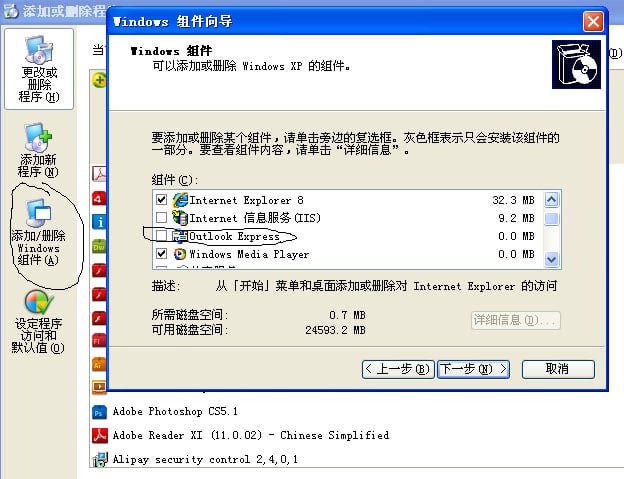
c30af30748fb1dc87650c57bf35af7ec
could someone here delete this outlook completely. thank you.

Bill

Dani AI

Generated

As suggested, first confirm whether the running program is Outlook (the Office app) or Outlook Express (an older Windows component). They look similar in screenshots but require different removal methods: Outlook is part of an Office install and is removed through the Office/uninstall flow, while Outlook Express on legacy Windows is a built‑in component that you can only hide/disable from Windows components. (learn.microsoft.com)

Quick diagnostic (do this before deleting files or editing the registry): identify the actual executable and its path. In Task Manager right‑click the Outlook process and choose "Open file location"; if that option is missing, use PowerShell to show the running image and command line:

Get-CimInstance -ClassName Win32_Process -Filter "Name='outlook.exe'" |
  Select-Object ProcessId, ExecutablePath, CommandLine

Knowing the path tells you which product you’re dealing with. The Win32_Process class and tools like Process Explorer are useful for this kind of inspection. (learn.microsoft.com)

If the path points to Office (Program Files\Microsoft Office) uninstall using Settings → Apps (Windows 10/11) or Control Panel → Programs and Features; if the product isn’t listed or uninstall fails, run Microsoft’s uninstall troubleshooter or the Office uninstall scenario in the Support and Recovery Assistant. For deeply stuck remnants Microsoft documents a manual cleanup procedure — follow it exactly and back up the registry first because wrong edits can break Windows. If Outlook is launching at login, check Task Manager’s Startup tab, Task Scheduler and use Autoruns to find and remove hidden autostart entries. (support.microsoft.com)

Practical note: editing registry keys or deleting program folders is a last resort. Reinstalling or repairing Office is often safer than piecemeal cleanup. If unsure, capture the executable path (the PowerShell command above) and use that info when asking for help.

Recommended Answers

All 3 Replies

hi,you say outlook ,but in your attachement you circle outlook express ,2 different programs ,Outlook express is not part of the office suite.
if you have the office install disk,or the office setup file on disk or on you computer you should be able to run it and uninstall Outlook .

hello Caperjack

thank you I have reinstall the system, it is over, anyway I am really apreciated

ok, thanks for posting back with the solution

Be a part of the DaniWeb community

We're a friendly, industry-focused community of developers, IT pros, digital marketers, and technology enthusiasts meeting, networking, learning, and sharing knowledge.