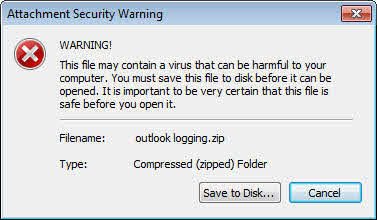
i configure the level 2 of attachments in gpo and i indicate the extension that i dont want the use to open them , when a user receiver an attachment let say .zip an attachment wanrnig window pop up ( print screen ) how i can disable it ?

Dani AI

Generated

A focused clarification based on the thread (notes for and referencing ): Outlook’s two attachment levels explain the popup behavior. Level 2 forces the “save before open” prompt; Level 1 completely blocks access (the attachment is visible in the InfoBar but cannot be opened or saved). To make a file type visible but not openable or savable, classify it as Level 1 rather than Level 2. (support.microsoft.com)

Practical steps (GPO-first, safer than per-user registry edits): in Group Policy Editor set User Configuration → Administrative Templates → Microsoft Outlook 2010 → Security → Security Form Settings → Attachment Security → “Add file extensions to block as Level 1” and enter the extension (for example: zip without the period). Also ensure the “Outlook Security Mode” policy is set to “Use Outlook Security Group Policy” so the attachment settings are enforced. After changing the GPO, update policy on clients (gpupdate /force) and restart Outlook or the workstation. The same behavior can be applied by writing the policy value under HKCU\Software\Policies\Microsoft\Office\14.0\Outlook\Security using the string name FileExtensionsAddLevel1 (semicolon-separated list). (scribd.com)

Quick registry example and troubleshooting pointers (apply only if GPO is not available):

reg add "HKCU\Software\Policies\Microsoft\Office\14.0\Outlook\Security" /v FileExtensionsAddLevel1 /t REG_SZ /d "zip" /f

If the popup or save prompt persists, verify that the GPO actually applied (gpresult /h report or RSOP), check the same Security key under HKCU\Software\Policies\Microsoft\Office\14.0\Outlook\Security on the client, and confirm “Display Level 1 attachments” or “Allow users to demote Level 1 to Level 2” are not enabling access. Note that Exchange/server-side or AV gateway policies can also affect attachment handling; test changes on a single client/OU before wide rollout.

Recommended Answers

All 3 Replies

DO you want certain attachments blocked, or do you want the user to save them then open them.

If you remove the GPO and/or the Reg key it created, does the pop up go away?

actually i configured the remove extension level 2 policy in gpo and i mentioned the extension that should be blocked for the user but when the user received for example an email with zip attachement anbd try to open it he got this windows , iwant to block this windows also , in other worlds i want the user to see the attachment without the premission to open it or execute it or even save it to his disk

You may be asking too much from Outlook....

Be a part of the DaniWeb community

We're a friendly, industry-focused community of developers, IT pros, digital marketers, and technology enthusiasts meeting, networking, learning, and sharing knowledge.