Member Avatar for Member #536365

Hi All,

I've been asked to setup a TLS conncetor between my company and a client site. Whilst there was a lot of useless information going back and forth, I managed to set up the connector. The only thing is I'm not sure it's working.

As I said, I think I set it up OK, but I think the firewall is stopping the connector. So, my question is this... What port, or ports, does the TLS connector use in Exchange 2010?

I've read many articles, including a forum post or two in DaniWeb, and I think it's either 465 (my preferred choice), or 995 (which I think is for Secure POP3).

If you have an answer, please provide a link so I can verify your response.

Thanks

Dani AI

Generated

Short answer: for Exchange 2010 a “TLS connector” between organisations is just SMTP with STARTTLS running over the normal SMTP port (TCP 25) for server‑to‑server mail. Client submission uses port 587 (STARTTLS) or port 465 for implicit TLS (submission); port 995 is POP3S and not used for SMTP connectors. (learn.microsoft.com)

Troubleshooting checklist (common gaps we see in forum threads):

  • Ensure TCP 25 is open both directions between your Exchange server (or Edge) and the peer/smart‑host.
  • Verify the connector advertises STARTTLS: EHLO the target and look for “250‑STARTTLS”, or use OpenSSL to force a STARTTLS handshake:
openssl s_client -starttls smtp -connect mail.partner.example:25 -crlf -showcerts

The OpenSSL output shows whether a TLS handshake succeeds and which certificate is presented. (isscloud.io)

If you must enforce encryption, set the connector to require TLS (the connector exposes a RequireTLS/TlsAuthLevel option so Exchange will refuse non‑TLS deliveries). Also confirm the certificate used for SMTP is enabled on the server and matches the FQDN your connector uses (or configure the connector’s TlsCertificateName). If you need mutual TLS (Domain Secure), both sides must trust each other’s CA and have the connector configured for DomainSecure/RequireTLS. Be aware Exchange 2010 may need specific updates to negotiate modern TLS versions. (learn.microsoft.com)

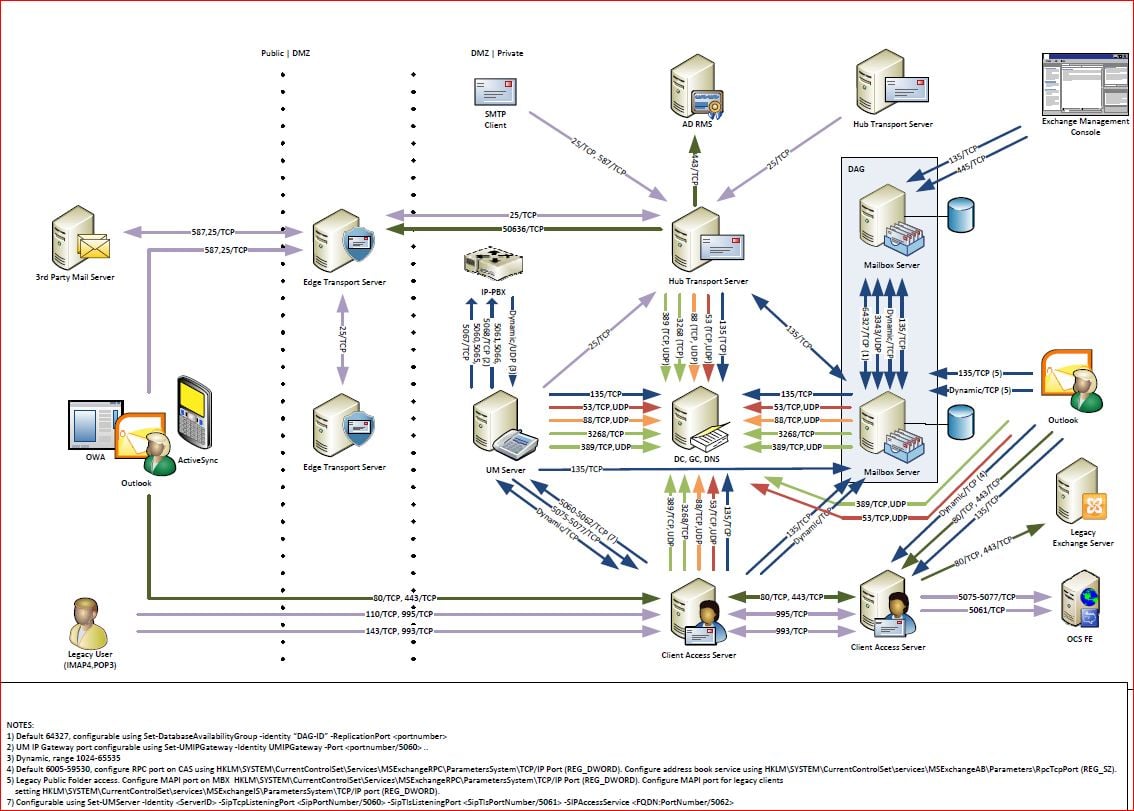
This builds on ’s pointer about opportunistic TLS and ’s port diagram — the practical next steps are to open/confirm port 25 at the firewall, run the openssl test to watch the STARTTLS handshake, and then verify certificate binding and connector TLS settings on the Exchange server.

Recommended Answers

All 2 Replies

TLS will run over port 25 and is usually oppurtunistic.

To force TLS over a send connector you would use:
Set-SendConnector 'Name-of-connector' -RequireTLS $true

In that case, if TLS could not be negotiated, no connection is made.

BTW, if you want to enable tls globally, check it with a website called checktls.com

commented: correct! you beat me to it! +12

I assume that the post from CimmerianX answered your question. However I found a picture of the Exchange ports that might be of interest to you. See attached jpg.
cf47ccd4e8f6db0de65f82f722914edb

Be a part of the DaniWeb community

We're a friendly, industry-focused community of developers, IT pros, digital marketers, and technology enthusiasts meeting, networking, learning, and sharing knowledge.