I need help. We have a home computer with Windows 2000 on it. We let one of the kids set up their own password protected profile so that at start up you have to chose their name and enter a password to get in to their "portion" of the computer. My wife is concerned because our daughter changed her password and so now she can't gain access to our daughter's portion of the computer. Any suggestions on how to open access up again?

Dani AI

Generated

Good suggestions from and ; a couple of important follow-ups that matter long-term.

Resetting an account from an administrator will restore logon access, but it is not identical to the user changing their own password. If any files were encrypted with EFS or if saved credentials are protected by the user logon secret, an admin reset can make those encrypted items inaccessible unless an EFS recovery agent or the original password is available. Before making any account changes, make a full copy of the profile folder (for example, C:\Documents and Settings\<username>) to an external drive.

If files are inaccessible because of NTFS permissions after restoring access, the administrator can take ownership and then grant full control. From the folder Properties -> Security -> Advanced -> Owner, change ownership to Administrators and check the option to replace owner on subcontainers and objects. From a command prompt the permissions can be reset; for example:

cacls "C:\Documents and Settings\Daughter" /E /T /C /G Administrators:F

Longer-term precautions: keep a dedicated parent Administrator account with a strong password not shared with children; make kids' accounts non-administrator (regular User/limited) so they cannot change system accounts; schedule regular backups (NTBackup or a third-party tool) of profiles; and consider upgrading to a modern Windows with family controls. If EFS-encrypted data is suspected and no recovery agent exists, professional data-recovery services may be required. Avoid ad-hoc password-cracking tools on important data unless comfortable with the risks.

Recommended Answers

All 3 Replies

The administrator should simply go to the "Users" control panel and change the password back.

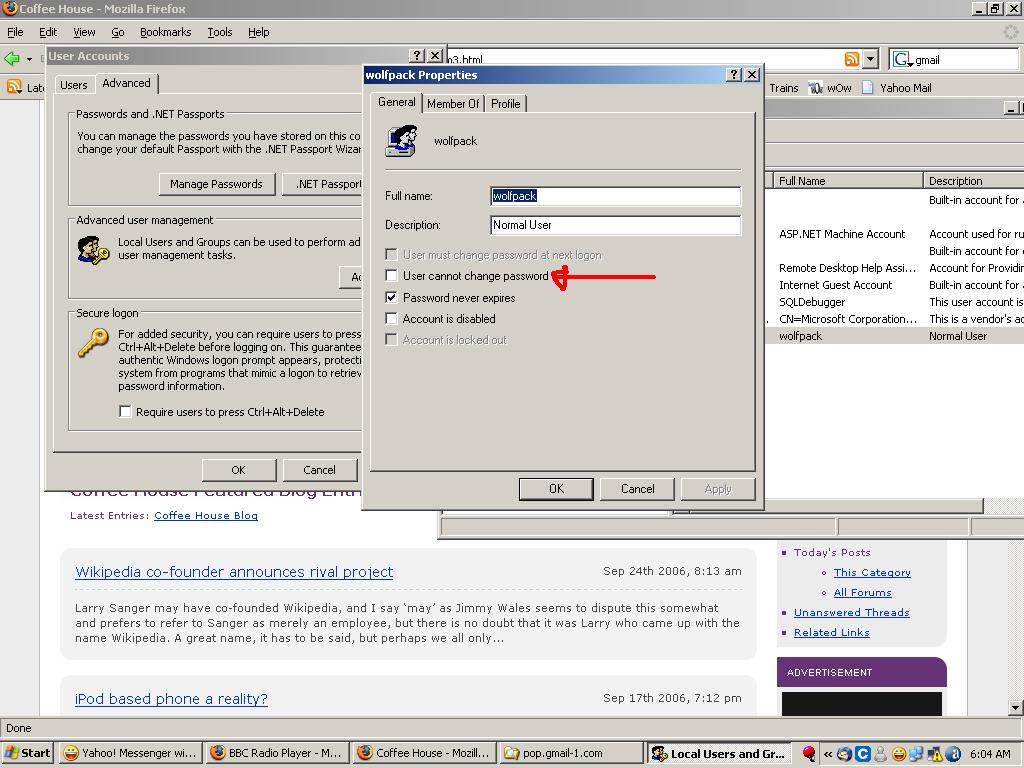
And to stop her from changing it again, you can tick this checkbox.

Thanks for the help!

Be a part of the DaniWeb community

We're a friendly, industry-focused community of developers, IT pros, digital marketers, and technology enthusiasts meeting, networking, learning, and sharing knowledge.