Hello,

I'm new here and I have read all of the threads about the same problem as mine i.e., making my netgear work. However, after doing all the solutions offered, I still can't connect to the internet may it be via lan or wireless connection through my router.

I have already done the following:

1) reset up manually my connections: modem, the router and my pc (in this order) also waiting for all three to boot up first before booting the next
2) i have entered my ISPs given login and password on the basic settings page

these are my problems:
1) for example, when i click on the wizard, the site says, PPoE connection found. which is true since i'm using a PPoE DSL connection. when i click on next, it goes to the PPoE page where I enter my DSL details. When i click on apply, i am redirected to the basic settings page, and i reenter all the dsl details i entered from the page before. but when i click on apply on this current page, or even the test button, all that happens is that the page gets refreshed. this happens eveytime (i even tried setting up on 2 different laptops). I can't seem to get to netgear's test page no matter what i do. i just always get redirected to the basic settings page. why is that? what should i do???

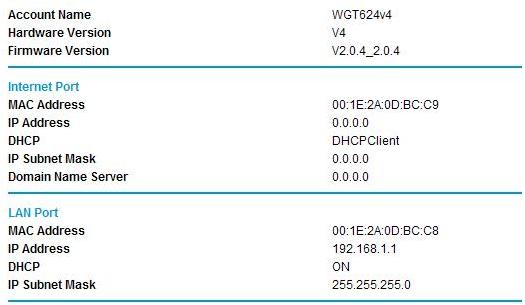
2) also, i read from a previous thread that i should check on the router status for any IP address and that i should have one. however, when I set up my router, it always ends up with the settings shown on the attachment.

I really hope you could help me with this. I'm getting a little desperate :( I don't know what else to do as I think I have done most if not all of the things that needs to be done. maybe I am missing something?

Thank you very much in advance, any help would be greatly appreciated. thanks!

-- christine
Dani AI

Generated

The behaviour described by — the router UI bouncing back when trying to save PPPoE settings and no WAN address — usually narrows to a few causes: a browser/UI quirk, the modem handling PPPoE instead of the router (double NAT), ISP-side authentication or MAC binding, or a router firmware/config bug. Calling the ISP, as suggested, is a good step, but a quick local triage will show whether the line or the Netgear is at fault.

  1. Test the line/credentials directly. Connect a laptop to the modem (bypass the Netgear) and initiate a PPPoE connection from the OS (Windows: set up a Broadband/PPPoE connection; macOS: create a PPPoE service). A successful direct connect proves credentials and line are OK.
  2. If direct PPPoE works, put the modem into bridge/passthrough mode (or ask the ISP to do so), factory-reset the Netgear, connect modem LAN -> router WAN, and configure the router’s Internet type to PPPoE from a wired PC. Use a different browser or private mode and clear cache if the UI keeps redirecting.
  3. If direct PPPoE fails, contact the ISP and ask them to check account authentication, drop any existing PPPoE session, and confirm whether MAC binding or VLAN tagging is required.
  4. If the router never receives a WAN IP after correct steps, manually update router firmware (download on another connection and upload via the router UI) and check the router log for PPPoE/auth errors. Netgear recovery tools exist if firmware is corrupted.

Notes and cautions: common traps are modem/router combo left in router mode, ISP VLAN requirements, and MAC-bound accounts. Firmware operations should be done on reliable power. Forum posts that get faster help include router model, firmware version, modem make/model, and exact ISP/line type.

I would call the ISP

commented: +1 +6
Be a part of the DaniWeb community

We're a friendly, industry-focused community of developers, IT pros, digital marketers, and technology enthusiasts meeting, networking, learning, and sharing knowledge.