From IDF 2010: Day 1 Keynotes & Announcements

WASDted 1 Tallied Votes 373 Views Share

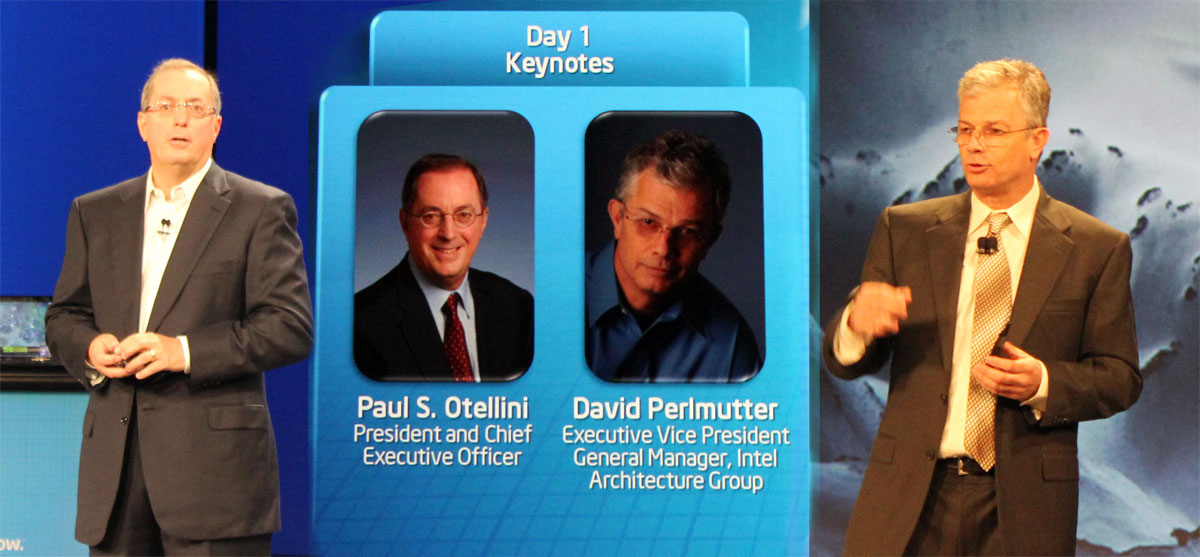
Day 1 of the Intel Developer Forum kicked off with some cool announcements from Intel's CEO, Paul Otellini and EVP/General Manager, David Permutter. First off Otellini went into some numbers, stating that Gartner estimates each day 1 million PCs are shipped. Next he reminded us that Moore's Law still lives strong and that Intel is on the way to a 22nm (nanometer) manufacturing process. He also explained (but not in great detail) that Intel's recent acquisition of McAfee will be integrated with vPro technology to create a truly secure, "trusted" software/hardware relationship. He went on to mention some additional recent acquisitions and explained that Intel will continue to acquire and integrated companies and technologies to achieve its goals to create a completely harmoneous, ubiquitous and secure ecosystem of connected devices that allow users to access their files and work across many platforms. When asked about Intel's plans to acquire more companies, Otellini stated that there aren't any plans on the table at the moment but they would certainly entertain an acquisition if "the right company at the right price" came along. He also said that Intel is not concerned about having spent 50% of its available cash on recent acquisitions and he is confident in Intel's ability to generate plenty more cash. Intel continues to support the MeeGo standard for app development across platforms and pushes Intel's AppUp store for netbook apps. Finally Intel officially introduced the second generation Intel Core processors [code named Sandy Creek]. This new line of 32nm processors brings powerful integrated graphics high-k metal gates, updated vector commands and other "turbo-mode" improvements. They will continue to be sold under the labels Core i3, Core i5, Core i7 and Xeon and will set the standard for the next generation of desktop and workstation processor platforms. Here are some videos that demostrate the speed and effiency difference between 1st and 2nd generation Intel Core processors. In both cases the gen-2 processors completed the task more than two times faster:

Side by side demo of 2nd Gen Intel Core processor vs. 1st Gen proc converting a photo to HDR[youtube]okIO4JxNtEI[/youtube] Side by side demo of 2nd Gen Intel Core processor vs. 1st Gen proc encoding a hi-def video for iPhone[youtube]oVRDll68ETU[/youtube] What's more they included a slide based on some IDC future-telling to illustrate that the world is headed towards even more massive techiness.


Be sure to stay tuned for more updates from IDF 2010 and follow @daniwebpress on twitter for the latest tweets from #IDF10.
Dani AI

Generated

A short, practical follow-up to ’s live notes and ’s comment — for anyone reading this thread years later and thinking about buying or upgrading a Sandy-Bridge–era system.

Compatibility and chipset choices matter. Sandy Bridge CPUs require the LGA‑1155 platform and the Intel “6‑series” family of chipsets; that means you can’t drop one of those CPUs into an older LGA socket. If you care about the CPU’s built‑in video features (Quick Sync) pick a board that exposes the CPU video outputs (H67/Z68 families); P67 boards were aimed at overclockers and typically don’t route the iGPU outputs, so Quick Sync won’t be available on those boards. (en.wikipedia.org)

BIOS and flashing checklist. Always confirm your exact motherboard model on the vendor CPU‑compatibility list and note the BIOS revision required for the CPU you plan to install. If the board needs a BIOS update to recognize the CPU, update the BIOS first (using your existing compatible CPU), or use the board maker’s “BIOS‑Flashback/Q‑Flash‑Plus/USB Flashback” feature where available to flash without a CPU. Follow the vendor instructions exactly, use a stable power source, and don’t interrupt the flash. (forums.tomshardware.com)

A crucial caution for buyers of early boards: some first‑ship 6‑series (Cougar Point) chipsets had a SATA controller defect (B2 stepping) that Intel corrected with a B3 stepping and OEM RMA programs — verify the board revision or that it was replaced under warranty before relying on older stock or used motherboards. (wired.com)

Driver and software notes. After a hardware swap, install the vendor chipset INF and the latest Intel graphics driver (or use the vendor‑trusted package). If you want Quick Sync transcoding plus discrete‑GPU gaming, Z68 + Virtu (or later platforms) was designed to let you use both — but that requires the right BIOS/board and recent drivers. For legacy HD3000/2000 systems, prefer vendor drivers when possible (some OEM laptops require OEM drivers). (tomshardware.com)

Quick checklist

  • Confirm exact motherboard model and CPU support entry on the vendor site.
  • Check required BIOS version; update before swapping CPUs if necessary (or use Flashback).
  • If buying used, confirm board revision (B3 for Cougar Point) or OEM replacement history.
  • After boot: install vendor chipset INF + Intel graphics driver (or Intel DSA if supported).

These steps cover the most common upgrade pitfalls and will save time (and grief) when working with Sandy‑Bridge hardware.

Ancient Dragon 5,243 Achieved Level 70 Team Colleague Featured Poster

Very intereting :)

>> and he is confident in Intel's ability to generate plenty more cash.
Who said we are in a recession? Apparently Intel isn't. I hope they are putting all that cash to good work that create new jobs instead of just putting it under their mattress for a rainy day.

Be a part of the DaniWeb community

We're a friendly, industry-focused community of developers, IT pros, digital marketers, and technology enthusiasts meeting, networking, learning, and sharing knowledge.