Hi Guys so here is the deal. I have two issues.

Here is #1:
I recently purchased a USED Processor AMD Athlon XP 3200-AXDA3200DKV4E to upgrade my current AMD Athlon XP 2900+ - AXDA2900DKV4E.

So I unplug my computer, power and all, place on rubber mat, wear the antistatic wrist - grounded - and off we go... Remove heatsink, remove old processor, placed new processor, place heatsink.. plug everything back in. Now this is what happened next:

1st Atempt: Screen was black and my monitor was not detecting and signals. Restart

2nd Restart: Seems like computer is going to load succesfully but right before it hits the windows splashscreen it goes black and does nothing.

3rd Restart: This time it loaded completely, but when it got to the windows login screen and i scrolled my mouse over my user name, that area turned black but i was still able to load my windows user. So the computer does its thing and loads itself but extremly slowly. I wait for it to load completly and open CPU-Z, while its loading my screen goes black and computer does not restart just stays black.

4th Restart: Blackness, nothing happened...

So i decide to put the old processor back in place, while im doing this, the heatsink is hot hot, so is the processor, which i thought was weird because when i had the previous processor in there I would never turn off the computer and it never got as hot as this one did. So i figured this eBay purchase was a damaged one, ill live with it! But why did it attempt to work in the first place? interesting :/

So this is where my second issue comes in. My "old" processor advertises:
Family AMD Athlon XP
Part number AXDA2900DKV4E
Stepping code AQYHA
Frequency (MHz) ? 2900 (rated)
2000 (real)
Bus speed (MHz) ? 400
Clock multiplier ? 10
http://www.cpu-world.com/CPUs/K7/AMD-Athlon%20XP%202900%2B%20-%20AXDA2900DKV4E.html

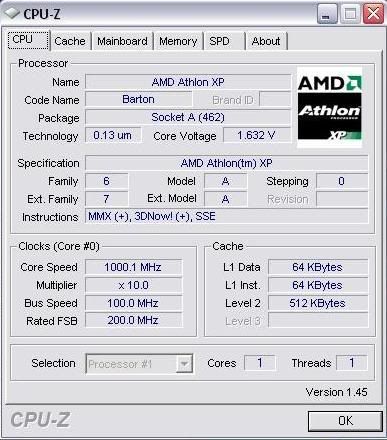
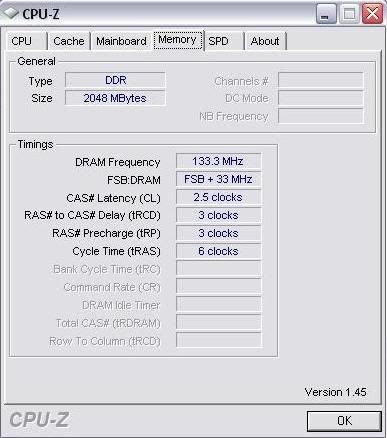
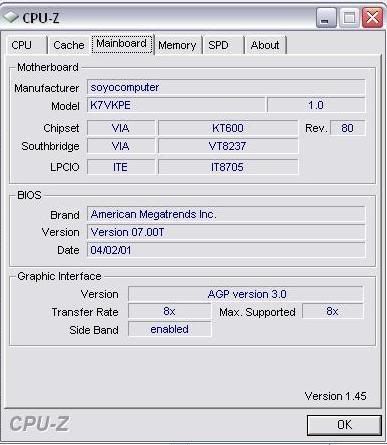
But this is what my computer is running at:
[img]http://i7.photobucket.com/albums/y288/Zonik/Processor.jpg[/img]
[img]http://i7.photobucket.com/albums/y288/Zonik/Memory.jpg[/img]
[img]http://i7.photobucket.com/albums/y288/Zonik/Mainboard.jpg[/img]

Now before purchasing the new processor i called soyo to see if the processor was compatible with my MB and they told me YES! But how can I get the old processor AXDA2900DKV4E to run at the speed it advertises?

Thanks for your help! :P

Dani AI

Generated

Good work by — the fix you found (cleaning the heatsink, restoring the correct FSB jumpers and clearing CMOS) is exactly the right process for the symptoms you described: intermittent POST, slow/unstable Windows, and high temperatures. For clarity: the AMD label "3200+" is a performance rating, not a 3.2 GHz clock; the AXDA3200DKV4E is a 2.2 GHz part (11 × 200 MHz FSB). That explains why the older "2900+" reports a much lower real clock than the model number might suggest. (techpowerup.com)

Dust in the heatsink is a very common cause of the hot-running behaviour you saw; a clogged fin stack can raise idle and load temps enough to cause instability or black screens. After removing the dust, reseat the cooler and apply a fresh, thin layer of thermal compound, make sure the fan runs freely, and confirm good case airflow. Those simple cleaning steps often restore stability and lower temps noticeably. (howtogeek.com)

If a utility (CPU-Z or BIOS) is showing ~2300 MHz, check the reported multiplier and base clock: core clock = multiplier × base clock. For example, 11 × 200 MHz = 2200 MHz. If the base clock is slightly off (210 MHz) you get ~2310 MHz, so verify the motherboard jumpers or BIOS FSB setting, then clear CMOS to return to defaults and re-enter the correct FSB/multiplier if needed. Clearing CMOS is the standard first troubleshooting step for BIOS/jumper mismatches. (dell.com)

If odd speeds or recognition issues persist, check the board maker’s CPU support list and consider a BIOS update so the board fully supports that stepping and FSB setting — older Soyo boards sometimes needed updated firmware to expose newer FSB options. Keep monitoring temperatures with a hardware monitor, document the jumper/BIOS settings you used, and avoid running the system with a loosely seated cooler. Thanks to for methodically isolating thermal, jumper, and CMOS issues — that sequence (thermal first, then BIOS/jumpers, then firmware) is the right troubleshooting workflow. (manuals.plus)

Recommended Answers

All 3 Replies

I fixed the problem!!!!!!!!!!!!!!!!!!!!!!!!!!!!!!!!

The reason why the heatsink and processor was getting hot is becuase of all the collecting dust inside the heatsink! i cleaned that!

Then i set the JP3 jumpers 1&2 - 3-4 to ON and my MB was running at 200FSB... so i put on the new AMD XP 3200+ processor and when i reboot the pc it went as normal... Now my computer is registering at 2300MHz!

Oh and i also reset the CMOS!

Thanks guys for your help! NOT

lol

Thanks guys for your help! NOT

your welcom ,i can believe you took all the precautions you did, and you installed the chip into your computer with a plugged heatsinc in the first place .lol

Be a part of the DaniWeb community

We're a friendly, industry-focused community of developers, IT pros, digital marketers, and technology enthusiasts meeting, networking, learning, and sharing knowledge.