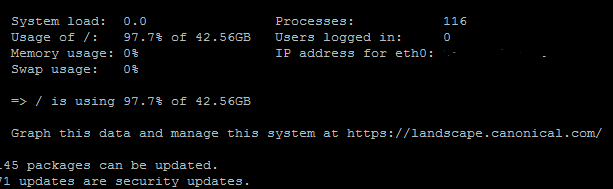
Hey there guys, I have a strange problem, I have many linux servers (ubuntu) I have a script installed on them
all servers works fine but one server dont keep login information, everytime I logged in its says hello to server then back to previous page wothout logging in, I've checked many artcles n internet about sessions save path and it was /tmp like ohter servers
I've checked the permession for folder /var/lib/php5 and its writeable
what can I do to solve this problem, no one on this server can login.

Dani AI

Generated

Short version: PHP sessions are written to disk. If the filesystem holding PHP’s session directory fills up, PHP cannot write session files and logins will appear to “bounce” back to the previous page. In this thread a very large MySQL log consumed the partition; removing it freed space and restored sessions. Good instincts from (inspect the log) and (reduce/rotate logging) pointed in the right direction.

Quick diagnostic checklist you can apply on any box:

  • Confirm which mount is full: run df -h and note the filesystem that contains your PHP session path.
  • Find big log files: du -sh /var/log/* | sort -hr | head -n 10.
  • If disk still appears full after removing a file, check for deleted-but-open files (processes holding space): lsof -nP +L1.
  • Look for PHP errors about sessions in the webserver/PHP logs (messages like “failed to write session data”).

A few safe, practical fixes:

  • If a rotated log (e.g. .1) is genuinely unneeded, move or compress it. If a process holds it open, deleting the filename won’t free space until the process closes the handle; truncating the file (sudo truncate -s 0 /path/to/that/log) frees space without removing the inode. Always keep a backup copy if the log is needed for investigation.
  • For a permanent fix: enable automatic rotation/compression (logrotate), turn off unnecessary general logging in MySQL unless you need it, and add disk-usage alerts so the situation is caught earlier.

Extra checks if sessions still fail: verify session.save_path is correct and writable, confirm cookies are being set in the browser devtools, and review PHP’s session-related error messages. For busy sites, consider moving sessions to a memory store (memcached/Redis) or a database to avoid single-disk bottlenecks.

Recommended Answers

All 5 Replies

603e93991414dc7dbd8ca2ab1de4f6cc

I found my Space is nearly full is that affect ? and how to reduce it ?

I found a file in /var/log/upstart called mysql.log.1 with size 40GB is it safe to delete it ?

See what it contains. If it's the (slow) query log, and you have a backup, it will be safe to delete.

Also mysql.log.1 is not the current log file, it's an old copy, so it can be moved to another location for further analysis or deleted, the main in use is mysql.log. Since it's a general log you can stop it, by commenting the line related to the general_log_file.
Just enable: error.log, mysql-slow.log and expires_logs_days, so you can limit the amount of data. To edit these options run:

sudo editor_of_choice /etc/mysql/my.cnf

Example settings:

#general_log_file        = /var/log/mysql/mysql.log
#general_log             = 1
log_error = /var/log/mysql/error.log
log_slow_queries = /var/log/mysql/mysql-slow.log
long_query_time = 2
log-queries-not-using-indexes
expire_logs_days = 10

Reload mysql after you've done.

commented: AWESOME +2

every thing solved by deleting this file, and thanks for the tips about expire_logs_days

Be a part of the DaniWeb community

We're a friendly, industry-focused community of developers, IT pros, digital marketers, and technology enthusiasts meeting, networking, learning, and sharing knowledge.