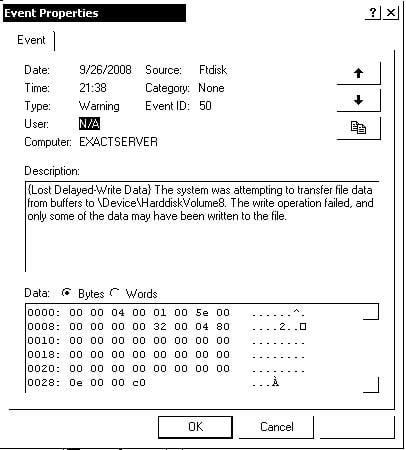
I have a Windows 2000 server computer, do backups on usb hard drives.
Get the following error during backup of about 90Gb of data.
This error is not always generated.
I am using 3 external disks in turn.

Source Ftdisk, Event ID 50.

Dani AI

Generated

— intermittent Event ID 50 from source FTDISK during large USB backups most often comes from an I/O timeout or USB/enclosure/driver problem rather than a simple "out of space" issue. Before we chase fixes, please post the exact Event 50 text (the event usually names a disk number and an LBA/offset). That exact message is the best clue to whether this is a failing device, a driver timeout, or something the backup app is doing.

Quick, practical checks you can run now: try copying a single very large file to each external disk with Explorer or xcopy to see if the copy itself fails; connect the drive directly to a different USB port (no hub) and use a powered enclosure or Y-cable if the drive is bus‑powered; run chkdsk /r on source and target; test the backup to an internal drive (if that works, the USB path is suspect); update motherboard chipset/USB mass‑storage drivers and any enclosure firmware; and if you use NTBackup, try a smaller test job or change verify/splitting options to see if that changes the behavior.

If you still see errors, paste the full Event 50 entry and say which backup software you use. If the event names a specific Disk number or logical block repeatedly, plan to replace or re-seat that drive/enclosure — repeated I/O errors are a hardware failure warning. Thanks to for the pointer to Microsoft guidance; once you post the full event text we can be more specific.

Recommended Answers

All 3 Replies

is there a difference in the amount of data the 3 drives can hold? I'm thinking you might be getting a disk full error on one of them...

I checked, all of them has enough space for the backup

Be a part of the DaniWeb community

We're a friendly, industry-focused community of developers, IT pros, digital marketers, and technology enthusiasts meeting, networking, learning, and sharing knowledge.