Anyone know why my sound keeds getting set to mute? It gets set to mute every once in awhile, I don't know why.

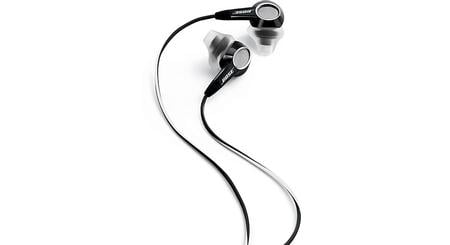
Also, on related question, I have a set of Bose ear phones, the kind you stick in each ear (see thumbnail). The problem is that sound comes out one ear but not the other. I've checked the balance setting on the computer and both left/right are both set to the same thing, the volume setting is as high as possible, and I have tried wiggling the end of the cord that plugs into the computer. Nothing seems to correct the problem. Any ideas?
Dani AI

Generated

Two separate problems are likely here: the system volume being toggled to mute intermittently, and one earcup on the Bose buds not producing sound. Both can happen together but usually have different causes. As suggested, a key/button shortcut is a common culprit for stray mutes; below are focused, practical checks to isolate and fix each issue.

For the intermittent mute:

  • Watch the system tray speaker icon when it happens and open the Volume Mixer (right-click speaker icon -> Open Volume Mixer) to see if the master or a specific application is muted.
  • Check Control Panel -> Sound -> Communications and set "When Windows detects communications activity" to "Do nothing" (prevents auto volume reduction).
  • Look for stuck media/mute keys or background utilities that map keys to mute (laptop Fn keys, vendor hotkey software). Disable or uninstall any third-party keyboard/audio utilities and test.
  • Update or reinstall the audio driver and the vendor audio control app (Realtek, Conexant, etc.). If muting began after a change, try rolling back the driver.
  • If a headset with inline controls is used, that in-line button can send a mute signal — try a different headset to rule that out.

For the one-ear problem:

  • Confirm whether the fault is the buds or the PC: test the Bose buds on a phone/another device, and test a different pair of headphones on the same computer.
  • Try the rear and front jacks (if available), and ensure the plug is fully seated. TRS vs TRRS plugs can behave oddly in mismatched jacks.
  • Use Windows stereo test: right-click speaker icon -> Playback devices (or Sounds) -> select your playback device -> Configure -> Test to verify left/right channels reach the PC.
  • Gently flex the cable near the plug while audio plays — intermittent return of sound points to a broken wire (common). Inspect the jack for lint and clean carefully; avoid metal poking.
  • If the buds fail on other devices, they likely need repair or replacement; if they work elsewhere but not on the PC, use the rear jack or a USB audio adapter to bypass a faulty onboard jack.

Extra notes and cautions:

  • Avoid aggressive wiggling or prying; gentle tests are safer. If the problem is intermittent, keep a short log of when it happens (apps running, keys pressed) to spot a pattern. If hardware diagnostics point to the PC jack, a low-cost USB sound dongle is a quick, reliable workaround.

Shot in the dark, but does it get set on mute whenever you press a key or button?

Maybe a button is set as a mute shortcut, and whenever you press it, it inadvertently mutes

Be a part of the DaniWeb community

We're a friendly, industry-focused community of developers, IT pros, digital marketers, and technology enthusiasts meeting, networking, learning, and sharing knowledge.