Hello community,
For some reason when my laptop has the charger plugged in i have sound then when i unplug the charger there is no sound and i have checked the sound levels they at at 100% and still no sound

Also when i plug and unplug the charger i get this popup
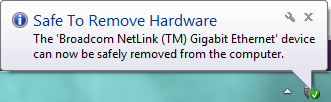
Untitled-11

It's almost like the charger is a USB

Can someone please help me

Dani AI

Generated

Following and , this looks like an AC/battery state change that is affecting Windows audio. The most useful approach is an ordered checklist: start with quick GUI checks, move to driver and power-settings fixes, then use hardware/OS isolation if the problem persists. Create a system restore point before making driver or firmware changes.

Quick checks (fast wins)

  • Open the sound control panel (right‑click speaker icon → Sounds or Sound settings → Manage sound devices). Enable "Show Disabled/Disconnected devices", then verify the correct playback device is enabled and set as default. Try headphones and HDMI/line-out to see which outputs are affected. On the Communications tab choose "Do nothing" to rule out auto-volume rules.

Driver and Windows power settings

  • Update/reinstall the audio driver from the laptop maker (prefer OEM drivers, not random third‑party files). In Device Manager (devmgmt.msc) uninstall the audio device, reboot and let Windows reinstall, or manually install the OEM driver. Disable audio enhancements and Exclusive Mode in the device Properties → Advanced tab. In Power Options → Change advanced power settings, set the plan to High Performance for a test and disable features that can power‑save PCI/USB (USB selective suspend, PCI Express Link State Power Management). For USB audio devices, uncheck "Allow the computer to turn off this device to save power" on USB Root Hubs.

Deeper diagnostics and next steps

  • While plugging/unplugging the AC, watch Device Manager and Event Viewer for devices appearing/disappearing. Boot a Linux Live USB to confirm whether the fault is hardware or Windows/driver related. Check BIOS/firmware for any audio power or eco settings and consider a BIOS update only from the OEM site. If audio works only on AC and not on battery despite all checks, the internal amplifier or power regulation may be failing — contact OEM support or use an external USB sound adapter as a workaround.

The reason could be the malfunctioning of drivers, Have you checked the power plan for the profile ?

Be a part of the DaniWeb community

We're a friendly, industry-focused community of developers, IT pros, digital marketers, and technology enthusiasts meeting, networking, learning, and sharing knowledge.