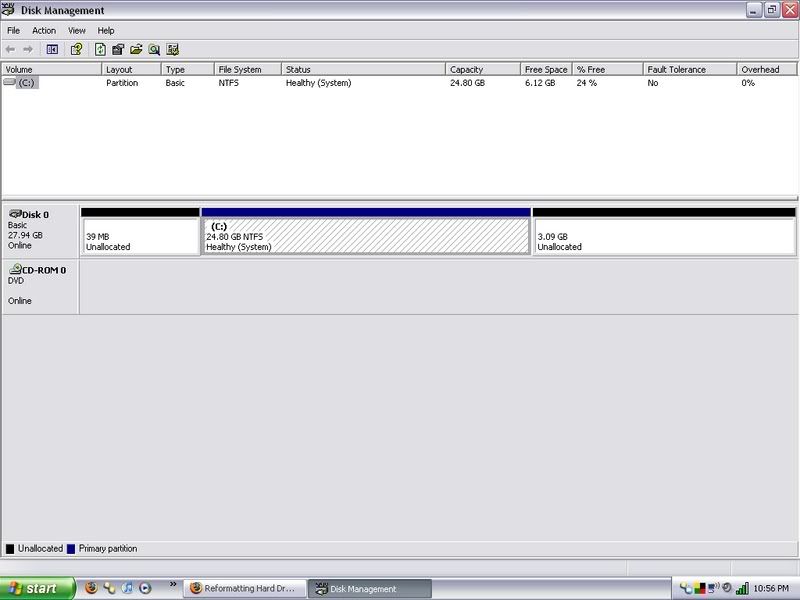
I borrowed a friends office xp cd to load it on my computer. I need to reformat my hard drive to get rid of a partition but dont want to lose office xp. How can I back this up. I have everything else I need saved or backed up on an external hard drive. trying to get rid of this extra partition:
[IMG]http://i23.photobucket.com/albums/b360/njstecher/diskmngmnt.jpg[/IMG]

Dani AI

Generated

For : there are two safe ways to keep a working Office XP install when changing partitions — preserve the current Windows/Program state by imaging the disk, or gather everything needed to do a clean reinstall quickly (product key + installer). The thread already points at partition tools and licensing concerns (see and ); below are practical, non‑destructive steps that fill the gaps.

Make a full image of the drive to external media before touching partitions. A disk image lets you restore the exact Windows state (registry, COM registrations, shared components) if anything goes wrong. Create bootable rescue media and save either the whole disk or at least the C: partition to the external drive. Tools to investigate: Clonezilla for a free, disk‑level image or the vendor site at Macrium for an easier GUI option. Also extract the Office product key from the running system so you can reinstall if needed; a utility that reads installed product keys is available from NirSoft.

If the 39MB partition is the only blocker, consider merging or removing it without wiping C:. Use a partition manager (for example GParted) from bootable media, but only after a verified image exists. After repartitioning you can either restore the image or perform a reinstall using the saved key and installer media.

Legal and practical notes: Office XP is long out of mainstream support and activation/licensing can be restrictive — confirm you have a valid license for the machine before reinstalling. If a reinstall is not feasible, consider modern alternatives such as LibreOffice. Quick checklist: export product key, make a full image, verify the image, then proceed with partition changes.

Recommended Answers

All 4 Replies

Member Avatar for Member #46692

You need the office xp cd. If you are just talking about office files, you can just save those files to usb or cd.

The actual office program you need a cd.

Im trying to save the whole program. all my files are already backed up.
I dont have access to the cd I used.

you cant because things are stored al over the place where they cant be backed up easialy (registry for example)

borrowing a friends office cd constitutes illegal software piracy btw

Assuming that it is the first, 39MB partition that you wish to lose, why not use a partition manager to merge it with C:? Windows may complain when you disturb its immediate environment [it knows where it lives and its immediate neighbours], but that is easily fixed by trashing a key - it will build a new one. As an example only, Paragon Partition Manager would do it for you.

Be a part of the DaniWeb community

We're a friendly, industry-focused community of developers, IT pros, digital marketers, and technology enthusiasts meeting, networking, learning, and sharing knowledge.