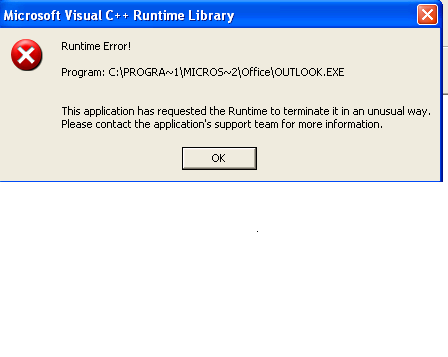
The error they get is:


Microsoft Visual C++ Runtime Library

Program: C:\PROGRA~1\MICROS~2\Office|OUTLOOK.EXE

This application has requested the Runtime to terminate it in an unusal way. Please contact the application's support team for more information.


Can anyone help!

Repaired Outlook and Ran the clean reminders..

Thanks, Rache

Dani AI

Generated

Brief expert addendum to the thread (following and ): a Visual C++ runtime crash that only happens when you accept/send a meeting response usually means Outlook is faulting while executing the “send response” code path — commonly a third‑party add‑in, a corrupted calendar item/PST, or an interoperability bug between Outlook/Exchange builds. The same symptom shows up in multiple Outlook 2000/Exchange reports from that era. (office-forums.com)

Targeted, practical diagnostic steps (fast order of work):

  1. Start Outlook in safe mode to rule out add‑ins:

    Outlook.exe /safe

    If the accept+send works in safe mode, disable all non‑Microsoft add‑ins and re‑enable one at a time to find the culprit. (support.microsoft.com)

  2. Repair or isolate mailbox/calendar data. Back up PST/OST first, then run the Inbox Repair tool (scanpst.exe) on the user’s data file; if the mailbox is on Exchange try recreating the profile and/or rebuilding the OST. Also run the Windows system checks (DISM then sfc /scannow) if DLL mismatches are suspected. Always keep a copy of the original data file before repair. (learn.microsoft.com)

  3. Capture the crash details. Check Windows Event Viewer (Application log) for the Outlook APPCRASH entry and note the faulting module/exception code — that module name is the best clue to whether the fault is in Outlook, a VC++ redistributable, an AV/toolbar component, or a print/driver DLL. Search the module name after you have it. (learn.microsoft.com)

Context and when to consider replacement: older Outlook 2000 clients had known meeting/request interoperability and reminder bugs (hotfixes existed) and many admins fixed recalcitrant crashes by applying available fixes or moving users to a later client. If add‑in and PST checks don’t isolate the problem, test the same mailbox on another machine/version — if it works there the local client/OS is at fault; if it fails there too, the item or server side formatting is suspect. (itprotoday.com)

Cautions: always back up PST/OST before running repairs or deleting profiles, and test changes in a controlled way (safe mode → disable add‑ins → scanpst → new profile) so you know which step fixed the issue.

Recommended Answers

All 6 Replies

Hmm... Interesting...

What version of Outlook is this?
What kind of connector are you using? (Exchange, Novell etc.)

It is Exchange, and the Outlook version is 2000.

I have attached the error also.

Just checked all updates for Outlook 2000 each one was already downloaded.

The user also advised me that although it goes in to the calendar the organiser of the meeting doesn't get notified of it being accepted.

Installed to office 2003 - this resolved it

Be a part of the DaniWeb community

We're a friendly, industry-focused community of developers, IT pros, digital marketers, and technology enthusiasts meeting, networking, learning, and sharing knowledge.