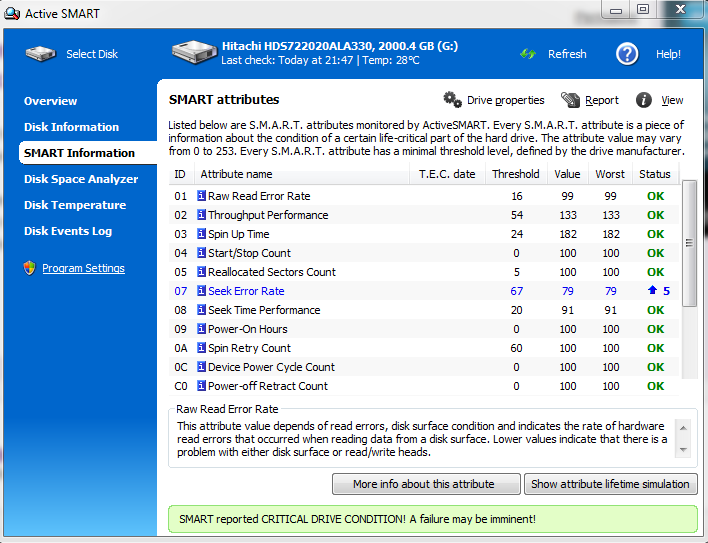
Short story, I use to use a 1TB drive and need to upgrade since I have many more files on 3 separate 500GB drives. So I decided to buy a 2TB to replace that drive and put the 1TB in a separate lower power pc just for downloading / seeds. I bought the drive online and received it today, so I started transferring files; my one major file (800GB) to the new 2TB drive and watched for a little over 1/2 hour and had to leave. Coming back I had 2 different programs, and a windows notification telling me the SMART info indicated ... pretty much a dying drive. I looked up the info / log monitor and it looks like the smart values steadily decreased over time.

It currently says my threshold, value, and worst (for seek error rate) is at a 67. (I'll upload a pic). It also says it has only been on for a little more than 200 hours, so it is not a long lived drive either, assuming once used for back-ups.

PS. When I received it, I immediately ran SMART tests and looked for any issues, like this, before starting the transfer (especially UPS delivering).

I want to know if this is from the large volume of transferred data, the rate is about 50 MB/s and transferring non-stop. The speed really has not decreased in the transfer rate. Should I run tests after the transfer, if so, like what? I just hate to transfer everything, wipe my other drive and have this one fail. I especially do not have the money to buy a backup drive, it was a push to buy this; why I use SMART on all of my other systems.

(UPDATE- I am so confused, I just went to post and the value changed, it went up a little but it is still telling me to back-up / the value is good & the drive I am transferring from, is even worse, so is it the volume of data? EDIT - THE VALUE OF THE 1TB WENT UP TOO...)

Thanks for your help!!

Dani AI

Generated

Brief, expert context: SMART's "Seek Error Rate" is a vendor‑specific indicator and not a single, universal fail/ok flag. Heavy, sustained I/O can change normalized SMART values and those values sometimes bounce back. The attributes that actually show data‑integrity problems are Reallocated_Sector_Ct, Current_Pending_Sector, Offline_Uncorrectable and UDMA_CRC_Error_Count. Seek fluctuations alone—without reallocated or pending sectors, CRC errors, or failed self‑tests—do not by themselves prove imminent data loss.

Useful, practical checks while data still exists: pause large writes and verify drive cooling (high temps make real problems more likely; see on temperature). Run the vendor diagnostic (SeaTools for Seagate, Data Lifeguard for WD) and a SMART short then long/extended self‑test. After the long test, inspect the key attributes above. A read‑only full scan will surface unreadable sectors; on Linux examples are:

smartctl -a /dev/sdX
smartctl -t long /dev/sdX
# after test completes:
smartctl -a /dev/sdX | egrep -i 'Reallocated|Pending|Uncorrectable|CRC|Seek'
dd if=/dev/sdX of=/dev/null bs=1M status=progress

Interpreting results: any nonzero or growing Reallocated_Sector_Ct / Current_Pending_Sector, Offline_Uncorrectable, or failed SMART long tests, or read errors from a full scan, indicate a drive that should be treated as defective and returned under warranty. If those checks are clean and temperatures are normal, the drive is likely usable—still keep the original media until verification is complete and maintain backups going forward.

Recommended Answers

All 2 Replies

1. A large transfer like this really stresses a drive.
2. New drives, if they are going to have problems, will exhibit them early in their life cycle, statistically speaking.
3. You probably did not monitor the drive's temperature. My experience is that overheating is the root cause of most failures of this sort. I regularly monitor my drives' temperature, and unmount them and shut them down when necessary. Some drive types are more susceptible to overheating than others. I have found Seagate 1TB and bigger drives are REALLY problematic in this regard. I have had much better experience with WD drives in the 1+ TB size range. My 2TB WD drives run about 40 degrees cooler than the same size Seagate drives, PLUS they have more spare sectors! 500GB drives don't seem to be as susceptible to overheating and bad sectors / seek/read/write errors.


So, send it back for warranty replacement to the manufacturer, or the vendor if they will accept it.

Anyway, I see there is a disk temperature selection on the window. What does that show while it is loading data?

Be a part of the DaniWeb community

We're a friendly, industry-focused community of developers, IT pros, digital marketers, and technology enthusiasts meeting, networking, learning, and sharing knowledge.