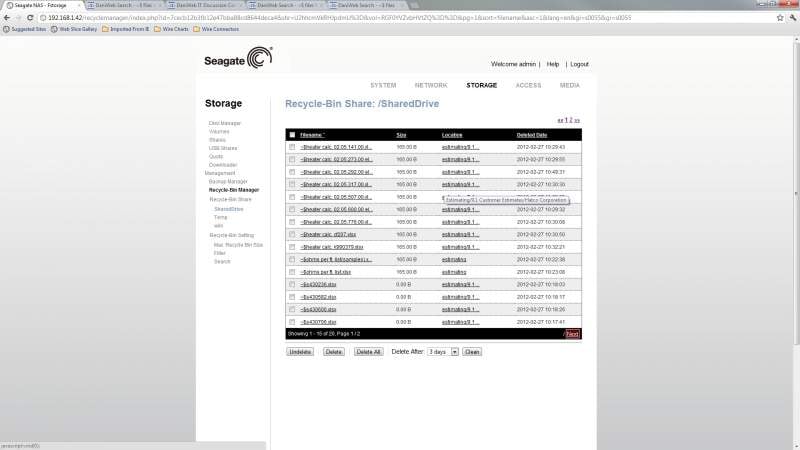
I am currently running Windows 7 Home Premium SP1, AMD FX-6100 Six-Core Processor 3.3 GHz, 8.00 GB RAM, 64-bit OS. My problem occurs while running Excel and Word 2007. However, all systems with 2007 or 2010 office have the same issues in our office.(Some are XP, Windows 7 and one Vista) We are using a Seagate NAS for the file storage and have been trying to use the recycle bin as intended with these drives to catch any good files from being deleted. However, every time a .xlsx or .docx file is opened an exact copy of the file is made that starts with (~$ + filename). Now the drive only allows you to filter files by extension and not how the file name starts. Is there a way to stop these files from being created? I have turned off the autosave feature without any change. I also have looked to see if AVG was causing this issue but the same thing happens with or without AVG active.

I do currently have the drive delete any .tmp files that excel/word creates during save operations. These disappear properly but we do not intend to keep any .tmp files. The .xlsx or .docx files can not be filtered since most files used are in this format and only the ones starting with ~$....xlsx/.docx are to be filtered.

Does anyone know how to stop ~$... files from being created? This will then not require the files to be deleted.
Dani AI

Generated

— short, practical summary that builds on replies from and .

Office creates a small per-document “owner/lock” file (the ~$(...) item) in the same folder to record who opened the file and to prevent conflicting edits. This behavior is part of how Word/Excel handle file locking on network shares and can’t be turned off from Office. (learn.microsoft.com)

Why you sometimes still see those files on a NAS: when Office closes cleanly it normally removes the owner file, but network glitches, antivirus/backup/replication activity, or certain NAS/SMB implementations can leave the owner file behind (an orphan). That orphan makes the ~$ file visible on the share and can show as a persistent “in use” condition. These are common server-side causes and many NAS customers handle this at the file‑server level. (myworkdrive.com)

Practical options (safe, ordered):

  • Don’t try to stop Office from making them — instead hide or clean them. On Windows you can hide protected/hidden files in Explorer so users don’t see ~ files. For server/NAS UIs, look for settings to hide files by prefix or exclude patterns. (superuser.com)
  • Exclude the NAS share from real‑time AV scans / short‑interval backups, or adjust backup timing so Office can remove the owner file after close. Check open files on the file server (Computer Management → Shared Folders → Open Files) before deleting anything. (myworkdrive.com)
  • If orphaned owner files are routine, use a cautious scheduled cleanup that only removes ~$ files older than a safe threshold (e.g., 24+ hours). Test in a single folder first. Example patterns:
    # PowerShell (Windows)
    Get-ChildItem "X:\Share" -Recurse -Force -Filter "~$*" |
    Where-Object { $_.LastWriteTime -lt (Get-Date).AddHours(-24) } |
    Remove-Item -Force
    # Linux (NAS with shell)
    find /mnt/share -type f -name '~$*' -mtime +1 -exec rm -v {} \;

    (Only use these after confirming no active editors; MyWorkDrive and other vendors document similar scripted cleanups and recommend conservative age/size checks.) (myworkdrive.com)

Longer-term: moving files to OneDrive/SharePoint with modern Office clients (or using Microsoft 365 co-authoring) reduces exclusive-lock behavior and the operational pain of owner files — note Office 2007 doesn’t support modern co-authoring, so upgrades are usually required. Test any server-side cleanup carefully and coordinate with users before removing lock files. (support.microsoft.com)

Recommended Answers

All 2 Replies

the answer is no

that is how it works

Those files are temporary files that are made by any office program. As soon something looks slightly different to the original it is technically a different document and is treated as such and goes away after you close that document that is open.

Be a part of the DaniWeb community

We're a friendly, industry-focused community of developers, IT pros, digital marketers, and technology enthusiasts meeting, networking, learning, and sharing knowledge.