I need to open this pptx-file. Can anyone help me with that?
Made in Microsoft PowerPoint 2010 and cannot been seen or open with any applications...
If it can't be open, how can I fix the file.

Dani AI

Generated

Several good suggestions already from , , , , and . The steps below avoid repeating those exact tips and add practical, low-risk options and deeper recovery actions you can try on a copy of the file.

Try PowerPoint’s built-in recovery first. Use File → Open, select the file, click the dropdown next to Open and choose Open and Repair. If PowerPoint crashes, start it in Safe Mode (hold Ctrl while launching PowerPoint or run the safe-mode option) so add-ins won’t interfere. Also upload the copy to OneDrive and open it with PowerPoint Online — the online renderer sometimes opens presentations that the desktop app refuses.

Check for autosaved or temporary copies before attempting package edits. In PowerPoint go to File → Info → Manage Presentations → Recover Unsaved Presentations. Also search the folder and %TEMP% for files with names beginning with ~ or PPT; right‑click the original file and check Properties → Previous Versions if System Protection or File History was enabled.

If you want to inspect the package contents without changing extensions, open a copy with 7‑Zip or another archive tool and examine ppt/presentation.xml, ppt/slides/slideN.xml and the ppt/_rels folders. A truncated slide XML or a relationship pointing at missing media is often the culprit. On a copy, remove the offending slide XML (and its .rels) and remove the slideId entry from ppt/presentation.xml, then recompress to a .pptx and test. This is an advanced manual repair — keep backups and make one small change at a time.

If none of the above works, try LibreOffice Impress or a reputable commercial PPT repair tool as a last resort (they can salvage embedded media and text). If the file arrived by email, also confirm the Unblock option in Properties as suggested.

Recommended Answers

All 6 Replies

But you can try if this helps:
1. Copy your PPTX file, and paste it any other folder.
2. Rename your file so that the PPTX file is now renamed ZIP -- accept any warnings that Windows provides.
3. Look at the files within the ZIP file if they contain any data you want.

If you are using Microsoft Office, you can download Microsoft Office Compatibility Pack
or you can download the , this will help you to just view the powerpoint presentation

if you can't open it with powerpoint 10 or later, the file is corrupt and quite possibly impossible to recover.
You can open it in a text editor and see if you can make sense of it (pptx files are XML, but hardly human readable).

Here's a long shot. Was this PPT file sent through e-mail? There is a security feature that some e-mail clients/servers has that automatically protects attachments from being opened.

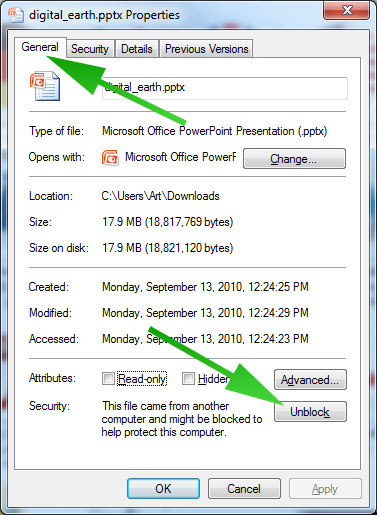
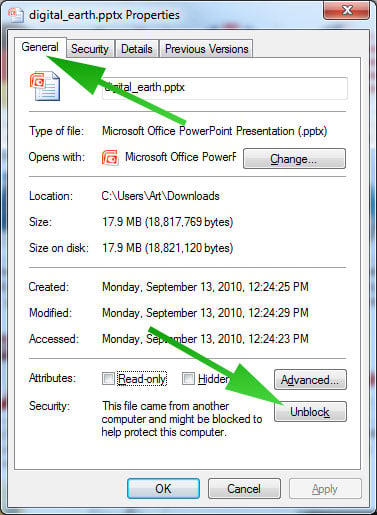
Save the file and then right-click over it to open the File Properties. Then click on the Unblock button as shown on the attached image.

Then, go to format -> slide design, choose to show all documents, and choose the corrupt powerpoint file. now, go to insert -> slides from file, and select the corrupt powerpoint file. make sure you are set to insert all slides, and then import. if that works, great! i suspect, however, that you might crash at that point. if so, try repeating the process, inserting specific slides one by one until you find the problem one. after that, save the file, making sure that fast saves are off (in preferences / save).
if you are unable to open your powerpoint files then try pptx viewer tool. this utility recovers your corrupt and damaged powerpoint presentations (.ppt, .pot, .pps, pptx and ppsx formats) from ms powerpoint files.
http://www.reddit.com/r/powerpoint/comments/368noy/i_want_to_open_powerpoint_presentation/

He has obviously forbidden this topic.
I bet he doesnt have MS office and thinks it's made by office 2010 cos of the extension.

Anyway, for those who don't have ms office and need to open point points, you can import them to google drive and convert to google slides. Then you'll have it and be able to edit it as well

Be a part of the DaniWeb community

We're a friendly, industry-focused community of developers, IT pros, digital marketers, and technology enthusiasts meeting, networking, learning, and sharing knowledge.