None of my USB ports are being read. Device maneger says all USb hubs are working properly. I can print or upload my music into my mp3.
Can anyone help

Dani AI

Generated

A compact, practical troubleshooting checklist that builds on 's chipset-driver suggestion and fills gaps left by the thread: prioritized tests, safe Windows fixes, and what points indicate hardware failure.

  • Quick hardware isolation: swap cables and try a known-good USB mouse or flash drive on every port (front and rear). Test the SanDisk and the printer on another machine or on a powered USB hub to separate device, cable, and port faults. Perform a full power drain (disconnect mains, wait 30–60 seconds) before restarting.

  • Clean Device Manager state: show non-present devices (Device Manager -> View -> Show Hidden Devices) and remove greyed/ghost entries under USB controllers and related device classes. Uninstall each USB Root Hub or Generic USB Hub entry and reboot so Windows redetects them. In each hub’s properties, Power Management -> clear “Allow the computer to turn off this device to save power.” Caution: uninstalling root hubs can temporarily remove USB keyboard/mouse — have PS/2 or alternate input ready.

  • Identify and reinstall chipset/USB drivers: use system tools to find the motherboard/manufacturer (for example, run msinfo32 or the command below) and download chipset/USB controller drivers from the board or PC maker’s support site rather than relying on generic drivers.

wmic baseboard get Manufacturer,Product,Version,SerialNumber
  • BIOS and OS isolation: confirm USB controller is enabled in BIOS (USB legacy/emulation settings) and only update BIOS if the vendor documents a fix. Boot from a Linux live USB to check whether USB works outside Windows; a successful live-boot detection points to a driver/OS issue.

If none of the above helps, the root hub or the motherboard USB controller (or insufficient PSU power) is likely failing; options then are a powered PCI/PCIe USB adapter or motherboard repair/replacement. This sequence expands ’s advice with concrete, low-risk steps before reinstalling the OS.

Recommended Answers

All 7 Replies

Please can you privide us with some more information such as:

  • What OS do you run and which service pack is it?
  • Make + Model of PC
  • USB version (1.1 or 2.0?)
  • Do you know what brand and model of motherboard you have? (may need to reinstall chipset drivers)

If you need help finding this information for us, we can assist you.

how can i find this info out

You need to be logged into an administrator-level account to do this (if you can install things etc.. that that means you are)

Go into control panel and choose "System" (i think holding down the windows/start menu key and pushing pause/break works too)

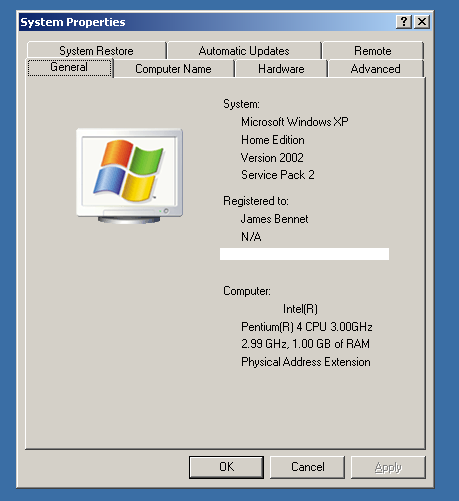
It should look like the picture i have attatched. Do not ever show anyone the windows serial number (the bit i have blanked out on mine)

The bits i am interested in are which version of windows and which service pack

ok its an XP version 2002
and a service pack 2

thats good (i was checking as XP SP1 and vista have USB problems sometimes)

When did the problem start?

If your PC has other USB ports on the back try them (sometimes the front usb ports can break from being used too many times)

It started a good 3 months ago with the printer not working Once i got a mp3 player and wasn't able to load things i figured out it wus the USB ports

I tried the back ones also but they're not reading either

I think you may need to reinstall your motherboard/chipset drivers. Consult your PC manufacturers website for these

Be a part of the DaniWeb community

We're a friendly, industry-focused community of developers, IT pros, digital marketers, and technology enthusiasts meeting, networking, learning, and sharing knowledge.