y my router always IP start from , i wan start with 192.168.1.1... how to do it?? i reset many times ady... still same...

Dani AI

Generated

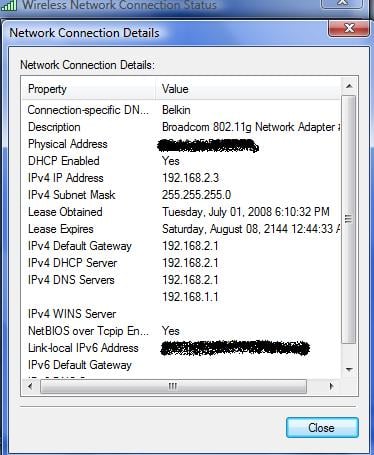
— others ( and ) pointed in the right direction that the address comes from the network device, not the PC. The missing bits below are practical checks to find why a factory reset still leaves you at 192.168.2.1 and what to do safely if you want 192.168.1.1.

Start by confirming which device is actually answering at 192.168.2.1. On a connected PC run the network commands to see the default gateway and the MAC address of the responder:

Windows:
ipconfig /all
arp -a

Linux/macOS:
ip route
arp -a

Compare the MAC you see with the label on the router (or the device physically connected to your WAN port). If the MAC does not match your router, an upstream modem or ISP-supplied gateway is handing out that subnet. To isolate the router itself, disconnect the WAN/modem and connect a single PC to a LAN port and retest.

Reasons a reset may not change that address: the router's factory default for that model can be 192.168.2.1; ISP-custom firmware may reapply settings; the unit could be operating as an access point/bridge with a different management address; or the reset button sequence used may not have completed a true factory restore. Check the device label and the model-specific reset procedure in the manual or ISP documentation before reflashing or deeper changes.

If you do change the router's LAN address, note clients will lose connectivity until they renew their leases. On Windows use:

ipconfig /release
ipconfig /renew

Also pick a subnet that does not conflict with any upstream device to avoid double NAT. Back up the router configuration first and contact the ISP if the router was provided by them. 192.168.x.x ranges are private addresses (RFC 1918) and are safe to use for local networks (RFC 1918).

Recommended Answers

All 2 Replies

y my router always IP start from , i wan start with 192.168.1.1... how to do it?? i reset many times ady... still same...

you set that up in the router LAN settings/DHCP server settings, not in the PC

How to do it depends on your router model, What's the brand and model?

There will be a setting that says something like LAN IP settings, or DHCP settings. You can set the IP range it will assign here.

Be a part of the DaniWeb community

We're a friendly, industry-focused community of developers, IT pros, digital marketers, and technology enthusiasts meeting, networking, learning, and sharing knowledge.