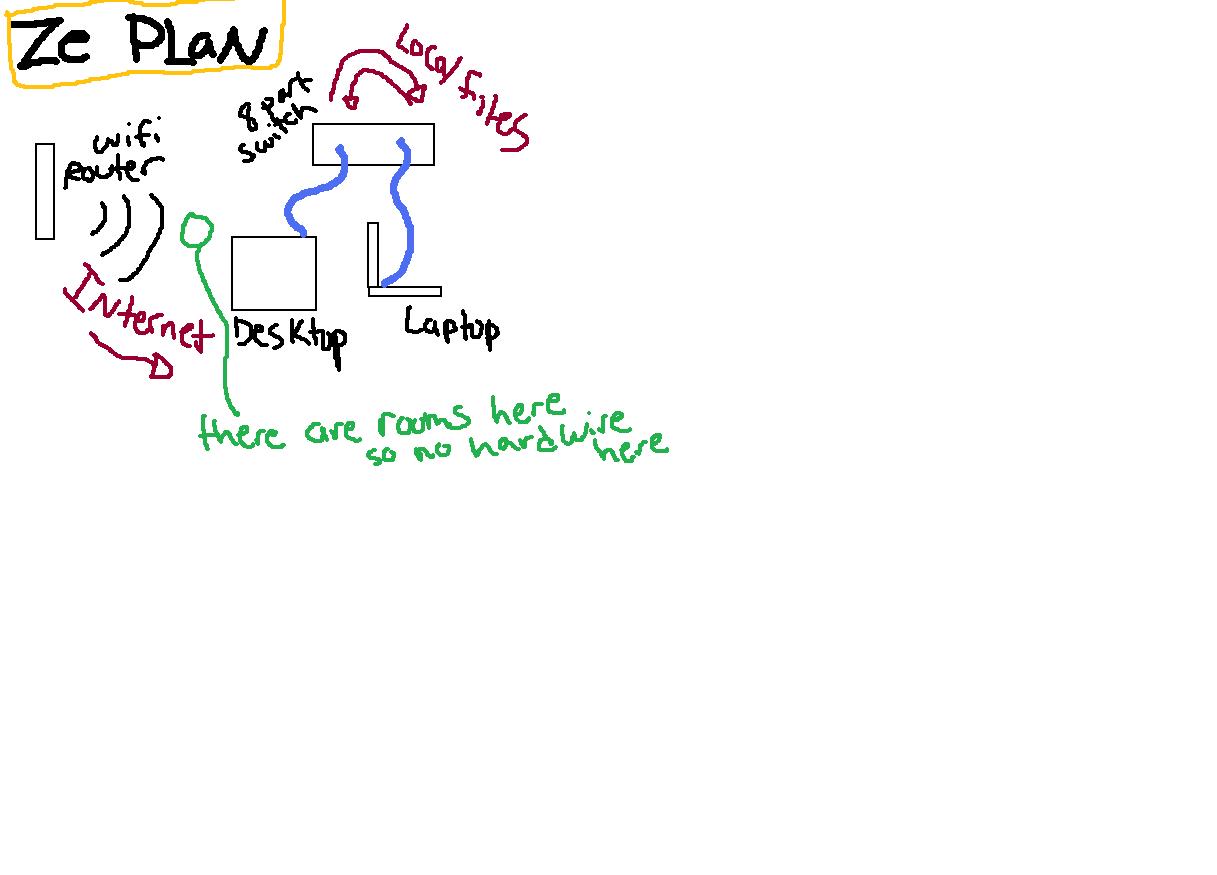
All right kiddos, heres the plan. I have wifi. yay, thats cool, but the router sucks. so what im wanting to do is have my 2 computers receive internet via wifi BUT send local files between them via hardwire -> ethernet to network switch.


computer specs
desktop:
smc usb wifi adapter
integrated NIC

Laptop
internal Atheros wifi card
integrated NIC

and Vista on both just to make life difficult

ideas?

p.s. visual reference included
Dani AI

Generated

has the right idea — keep Internet on the wireless adapter and force LAN traffic over the Ethernet switch. The quickest, least-invasive way on Vista is to give the wired NIC a static IPv4 address on its own private range and leave its Default Gateway blank; that removes any competing Internet route on that interface while keeping the wired path available for local transfers. Alternatively, use ’s separate-wired-subnet + name-mapping approach if name resolution without IPs is preferred.

Vista-specific steps to implement and verify (no DNS/hosts examples here; keep those as needed):

  • Set a static IPv4 on the wired adapter via Control Panel → Network and Sharing Center → Manage network connections → right-click the wired connection → Properties → Internet Protocol Version 4 → Properties → Advanced. Enter IP and mask and leave Default Gateway empty.
  • Ensure Network Discovery and File and Printer Sharing are enabled in Network and Sharing Center → Change advanced sharing settings.
  • If NetBIOS name resolution is required for LMHOSTS, enable NetBIOS over TCP/IP on the wired adapter (IPv4 → Advanced → WINS tab).

Quick command-line checks and metric tweaks:

ipconfig /all
netsh interface ipv4 show interfaces
route print

To prefer Wi‑Fi for the default route, either leave the wired gateway blank or lower the Wi‑Fi interface metric and raise the wired metric:

netsh interface ipv4 set interface "Wireless Network Connection" metric=10
netsh interface ipv4 set interface "Local Area Connection" metric=25

Troubleshooting notes tied to the thread: confirm Windows Firewall allows File and Printer Sharing on the wired profile, temporarily disable Wi‑Fi to confirm transfers use Ethernet, check NIC link speed/duplex and cable quality, and use ping <wired-IP> or large file copies to measure throughput. This combines ’s separation idea with Vista UI/command steps so local file traffic reliably stays on the switch while Internet continues over Wi‑Fi — applicable to ’s desktop (SMC USB) and laptop (Atheros).

Recommended Answers

All 4 Replies

Easy... Just assign a different subnet to the wired adapters using a static IP.

Then, create the entry in Hosts and lmhosts for the machines using the wired adapter IP.


So that, on each machine:
Wifi adapter ip via DHCP (i.e. ) with public dns
Wired adapter ip via static (i.e. )

lmhosts file contains:
pcname1
pcname2

hosts file contains
pcname1.yourdomain.com
pcname2.yourdomain.com


That way, your machines will use 192.168.2.x when addressing each other, but still hit the public DNS for everything else.

commented: explained very very well +1

Easy... Just assign a different subnet to the wired adapters using a static IP.

Then, create the entry in Hosts and lmhosts for the machines using the wired adapter IP.


So that, on each machine:
Wifi adapter ip via DHCP (i.e. ) with public dns
Wired adapter ip via static (i.e. )

lmhosts file contains:
pcname1
pcname2

hosts file contains
pcname1.yourdomain.com
pcname2.yourdomain.com


That way, your machines will use 192.168.2.x when addressing each other, but still hit the public DNS for everything else.

coolios, sounds good. will try when i get home

Easy... Just assign a different subnet to the wired adapters using a static IP.

Then, create the entry in Hosts and lmhosts for the machines using the wired adapter IP.


So that, on each machine:
Wifi adapter ip via DHCP (i.e. ) with public dns
Wired adapter ip via static (i.e. )

lmhosts file contains:
pcname1
pcname2

hosts file contains
pcname1.yourdomain.com
pcname2.yourdomain.com


That way, your machines will use 192.168.2.x when addressing each other, but still hit the public DNS for everything else.

alrighty i tried a few things and no luck so can you clarify a few things for me?

what do you mean by yourdomain.com, exactly that or...?
and both lmhost/host files contain both the IPs for 1 and 2? or just the other computer's IP? or does it matter?

i thank you in advanced kind sir.

DNS used FQDN (Fully Qualified Domain Name). Think or it as

At home, you probably have a workgroup setup for the 2 machines. Just use that workgroup name here. It really doesn't matter what you use here.

For example:

lmhosts and hosts can safely contain the IPs for both machines.


That way, if you ever need to address the other PC, you can use mypc2.myworkgroup.com. Your pc will do a lookup in the hosts file, see that there's an entry that points , to and use that IP for communication.

Think of the hosts file as DNS without a DNS server.

Be a part of the DaniWeb community

We're a friendly, industry-focused community of developers, IT pros, digital marketers, and technology enthusiasts meeting, networking, learning, and sharing knowledge.