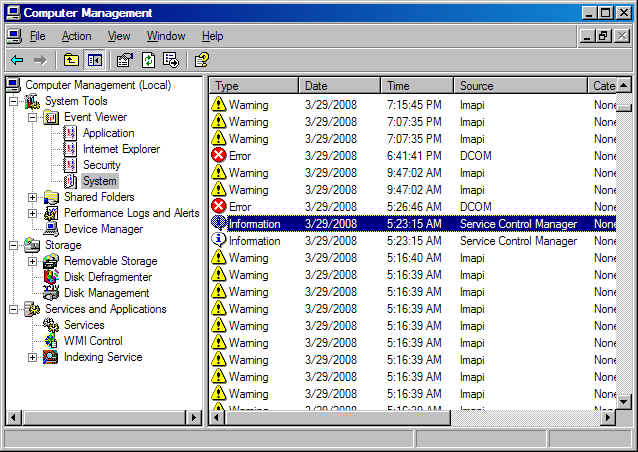
When I try to use My dvd to burn a movie, or just put a movie in, I get the blue screen and have to reboot. I viewed the log in my computer management and I got this,,,


"Event Type: Warning
Event Source: Imapi
Event Category: None
Event ID: 54
Date: 3/27/2008
Time: 12:31:12 PM
User: N/A
Computer: BEENAROU-OICU81
Description:
The description for Event ID ( 54 ) in Source ( Imapi ) cannot be found. The local computer may not have the necessary registry information or message DLL files to display messages from a remote computer. You may be able to use the /AUXSOURCE= flag to retrieve this description; see Help and Support for details. The following information is part of the event: .
Data:
0000: 00 00 00 00 01 00 54 00 ......T.
0008: 00 00 00 00 36 00 04 80 ....6..
0010: 00 00 00 00 00 00 00 00 ........
0018: 00 00 00 00 00 00 00 00 ........
0020: 00 00 00 00 00 00 00 00 ........


I do not understand what this means. I attached a picture of the system event viewer, do not know if this info will help.
I have updated all my drivers and system files. any help would be appreciated.

Dani AI

Generated

Short summary and focused next steps based on the thread: confirmed Windows XP Home with SP2 and posted a BSOD that names the UDFS_FILE_SYSTEM and points at imapi.sys. That narrows the problem to the UDF/imaging stack used for optical media — most often caused by a buggy driver or burning software, corrupted system files, or failing optical hardware/firmware. , and have already hit the main angles (updates, disk check, RAM test); the following organizes practical diagnostics in a safe order.

Quick checks (fast, non-invasive)

  • Make sure Windows Update is fully applied (SP2 alone can still miss later fixes).
  • Run System File Checker (sfc /scannow) to detect/repair corrupted OS files (imapi.sys could be damaged).
  • Do a disk health/repair scan (the disk-check approach mentioned earlier) to rule out file-system corruption on the HDD where the ripped files live.

Isolate software vs hardware

  • Temporarily remove or uninstall any third‑party burning suites (Nero, Roxio, etc.) and try a different burner app (a simple alternative) or Windows’ own burning process. If the crash stops, the third‑party stack is suspect.
  • Try different blank discs and/or a different physical burner (USB external) to see whether the fault follows the drive or the system. Update the optical drive firmware from the manufacturer after identifying the model in Device Manager.
  • As a diagnostic only, stop/disable the IMAPI CD‑Burning service to see whether the BSOD ceases (this prevents burning while testing).

Deeper diagnostics (if the problem persists)

  • Capture and upload the minidump files from %SystemRoot%\Minidump; use a dump viewer to confirm whether imapi.sys is the failing module or merely on the stack. That detail changes the recommended fix.
  • Run a multi‑pass RAM test (Memtest86/86+) as suggested by and .
  • Check for third‑party CD/DVD filter drivers (UpperFilters/LowerFilters under the CDROM class registry key) and remove only after backing up the registry.

If these steps don’t isolate it, swapping the drive is the fastest definitive test. Include the exact STOP code and dump stack in followups for targeted analysis.

Recommended Answers

All 9 Replies

O.K. new info on my problem. I got the dvd ripped to my hard drive, after that process I wanted to burn the files on a new dvd, and thats when it happens the blue screen of death. I attached a picture of the error and you are able to red the whole thing... HELP please

Assuming you're running XP, have you installed service pack 2 ?

There were known bugs in imapi.sys that sp2 should fix.

Sorry for not leaving sys info,,,,
Win XP Home Service pack2 is installed.

BSOD'S have error messages on them what was yours .
something like this .
0x00000040 (parameter, parameter, parameter, parameter) TARGET_MDL_TOO_SMALL

UDFS_FILE_SYSTEM 0x0000009B (0x000400E0, 0xaa30257c, oxAA302278, oxBA9C9E7e) Imapi.sys adress BAC9E7e Base at BA9c8000 datestamp 41107b6c

It could also be a faulty RAM stick.
Use an Admin tools software to test your RAM modules.

It could also be a faulty RAM stick.
Use an Admin tools software to test your RAM modules.

could be maybe ,but i dont think UDFS_FILE_SYSTEM points to bad ram .

You could try Memtest?

Be a part of the DaniWeb community

We're a friendly, industry-focused community of developers, IT pros, digital marketers, and technology enthusiasts meeting, networking, learning, and sharing knowledge.